Android-01 Introduction to Mobile Operating System
On This Page
What is Mobile OS?
- A Mobile Operating System (Mobile OS) is an operating system designed specifically for mobile devices such as smartphones, tablets, smartwatches, and other handheld devices.
- It controls the overall functioning of the device and acts as an interface between hardware and applications.
- Without a Mobile OS, a smartphone cannot operate or run applications.
What Mobile OS Does
- A Mobile Operating System manages device hardware and software resources.
- It allows users to install and run applications.
- It manages memory, processor, storage, and connectivity features.
- Examples of Mobile Operating Systems include Android and iOS.
Features of Mobile OS
- Touch Screen Support
- Mobile OS supports touch gestures like tap, swipe, and scroll for easy interaction
- It provides a simple and user-friendly interface for smooth navigation
- Multitasking Support
- It allows multiple applications to run at the same time efficiently
- Users can switch between apps without interrupting their work
- Connectivity Support
- It supports Wi-Fi, Bluetooth, mobile networks, and internet services
- Enables communication, data transfer, and online activities
- Application Management
- It allows users to install, update, and remove applications easily
- Supports app stores like Play Store and App Store
- Resource Management
- It manages RAM, CPU, battery, and storage efficiently
- Helps improve performance and reduce power consumption
Constraints of a Mobile Operating System
- Limited Battery Power
- Mobile devices depend on battery which drains quickly during continuous usage
- Heavy applications, games, and background processes consume more power
- Limited RAM
- Mobile devices have less memory compared to computers which affects performance
- Running many applications at once can slow down the system
- Limited Storage Space
- Storage capacity is limited and gets filled by apps, photos, and videos
- Users often need to delete unnecessary data to maintain free space
- Small Screen Size
- Mobile devices have small screens which limit the display of information
- Not suitable for complex tasks like detailed editing or multitasking
- Limited Processing Power
- Mobile processors are less powerful than desktop processors
- Heavy tasks and applications can reduce speed and performance
Requirements of a Mobile OS
-
Touch Screen Support
- Mobile OS supports touch gestures like tap, swipe, and scroll for easy interaction
- It provides a simple and user-friendly interface for smooth navigation
-
Multitasking Support
- It allows multiple applications to run at the same time efficiently
- Users can switch between apps without interrupting their work
-
Connectivity Support
- It supports Wi-Fi, Bluetooth, mobile networks, and internet services
- Enables communication, data transfer, and online activities
-
Application Management
- It allows users to install, update, and remove applications easily
- Supports app stores like Play Store and App Store
-
Resource Management
- It manages RAM, CPU, battery, and storage efficiently
- Helps improve performance and reduce power consumption
Types of Mobile OS
-
Android
- Android is a Linux-based mobile operating system developed by Google.
- It is open-source and highly customizable.
- It is widely used in smartphones and tablets from various manufacturers such as Samsung, Vivo, Oppo, etc.
- Android supports a large number of applications through the Google Play Store.
- It is currently the most widely used mobile operating system in the world.
-
iOS
- iOS is a mobile operating system developed by Apple Inc.
- It is used exclusively in Apple devices such as iPhone and iPad.
- It is a closed-source operating system.
- iOS is known for its strong security, smooth performance, and optimized user experience.
- Applications are downloaded through the Apple App Store.
-
BlackBerry OS
- BlackBerry OS was developed by BlackBerry Ltd.
- It was mainly used in BlackBerry smartphones.
- It was popular for its high-level security and business features.
- It was widely used by corporate and government organizations.
- It is now discontinued and no longer in active use.
-
Windows Phone
- Windows Phone was developed by Microsoft.
- It was used in devices such as Nokia Lumia.
- It featured a tile-based user interface.
- It offered integration with Microsoft services.
- It is now discontinued due to low market share.
-
Symbian OS
- Symbian OS was developed mainly by Nokia.
- It was one of the earliest smartphone operating systems.
- It was widely used in early Nokia smartphones.
- It supported basic smartphone features and applications.
- It is now obsolete and replaced by modern operating systems.
Comparison between Android and iOS
| Feature | Android | iOS |
|---|---|---|
| Developer | Developed by Google | Developed by Apple Inc. |
| Source Type | Open-source operating system | Closed-source operating system |
| Device Support | Used by many manufacturers like Samsung, Oppo, Vivo | Used only in Apple devices such as iPhone and iPad |
| Customization | Highly customizable with themes, widgets, launchers | Limited customization options |
| App Store | Google Play Store | Apple App Store |
| Security | Good security but more open to third-party apps | Very high security with strict app policies |
| User Interface | Varies depending on manufacturer | Uniform and consistent interface |
| Software Updates | Updates depend on device manufacturer | Updates provided directly by Apple |
| Market Share | High global market share | High but lower than Android |
History and versions of the Android OS
History of Android Operating System
- Android was founded by Andy Rubin in 2003 and was initially developed for digital cameras
- Google acquired Android in 2005 and shifted its focus from cameras to smartphones
- The name "Android" comes from Andy Rubin’s nickname
- The first Android smartphone was launched in 2008 (HTC Dream)
- Android is developed by Google along with the Open Handset Alliance (OHA)
Android Versions
- Android started with version 1.0 in 2008 and has evolved continuously with new features and improvements
- Early versions like Android 1.0 and 1.1 did not have dessert names
- From Android Cupcake to Android Pie, versions were named alphabetically based on desserts
- From Android 10 onwards, public dessert names were removed but internal codenames still exist
- Each new version focuses on better performance, improved security, enhanced UI, and support for new devices
Evolution of Android Versions
- Android 1.0 - 1.1 (2008-2009): Introduced basic smartphone functionality, Android Market, Gmail, Google Maps, browser, and camera support.
- Android 1.5 Cupcake - 2.3 Gingerbread (2009-2010): Added on-screen keyboard, widget support, improved browser performance, better UI, and NFC support.
- Android 3.0 - 3.2 Honeycomb (2011): Specifically designed for tablets with improved large-screen interface and system bar.
- Android 4.0 Ice Cream Sandwich - 4.4 KitKat (2011-2013): Unified phone and tablet platforms, improved multitasking, refined UI, and enhanced performance.
- Android 5.0 Lollipop - 7.0 Nougat (2014-2016): Introduced Material Design, ART runtime, split-screen multitasking, better notifications, and battery optimization.
- Android 8.0 Oreo - 9.0 Pie (2017-2018): Focused on background process limits, notification channels, AI-based features, and improved system performance.
- Android 10 - 13 (2019-2022): Removed public dessert names, introduced dark mode, gesture navigation, advanced privacy controls, and foldable device support.
- Android 14 - 16 (2023-2025): Focused on enhanced security, customization, AI integration, performance improvements, and better large-screen and foldable support.
Android Architecture
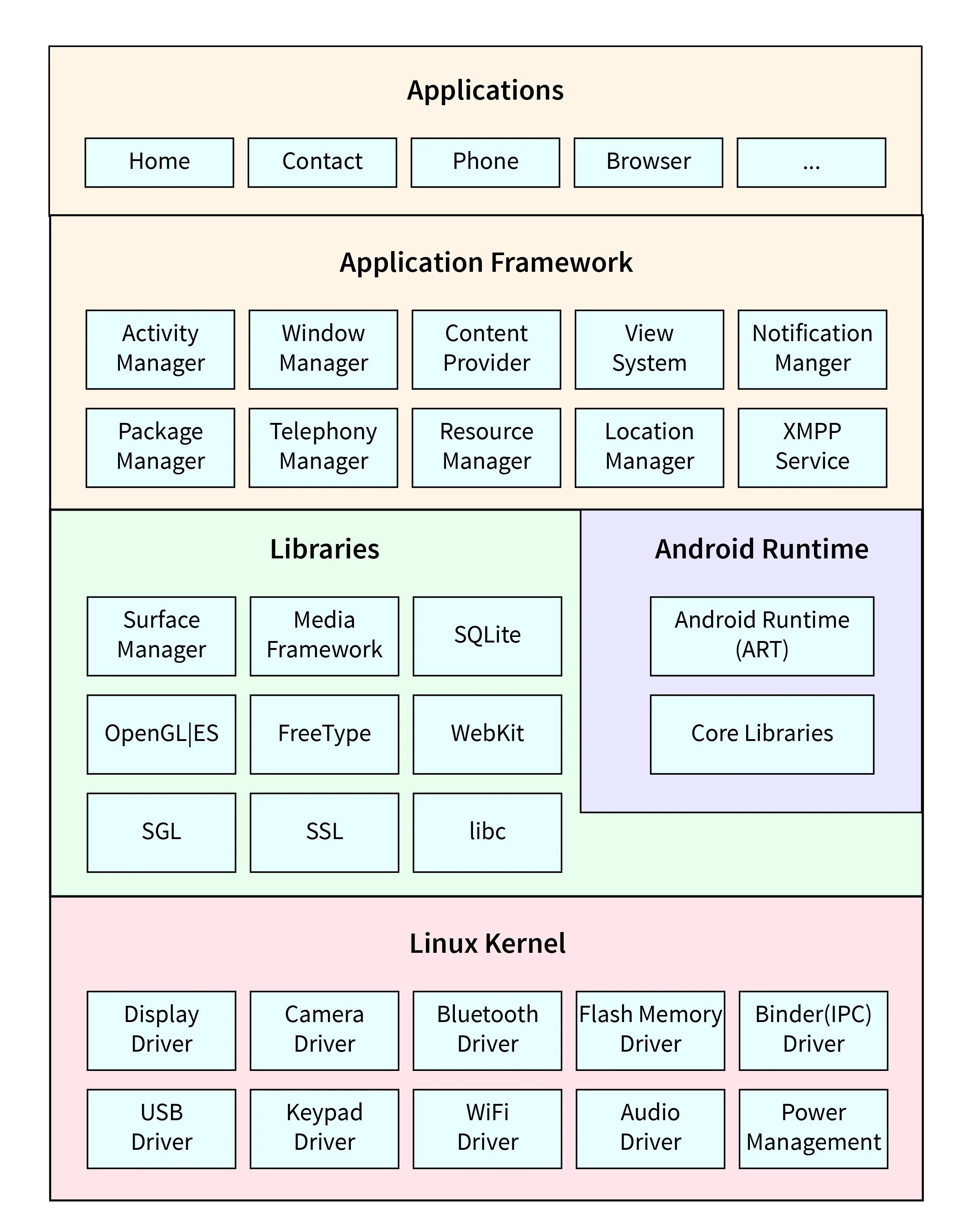
Introduction
- Android Architecture is a layered software stack that manages mobile device hardware and provides a platform for applications
- Each layer performs a specific function and all layers work together to run Android applications efficiently and smoothly
Explanation of Layers
1. Linux Kernel
- It is the base and lowest layer of Android Architecture
- It manages memory, power management, process management, and device drivers
- It acts as a bridge between hardware and software components and ensures proper communication
2. Native Libraries
- This layer contains important system libraries written in C and C++
- These libraries provide support for database, graphics, and multimedia features
- Examples include WebKit for browser support, SQLite for database, OpenGL for graphics, Media libraries for audio and video, and FreeType for font support
3. Android Runtime
- Android Runtime includes core libraries and Dalvik Virtual Machine (DVM)
- It is optimized for mobile devices and uses less memory than JVM
- It is responsible for executing Android applications and managing their performance
4. Application Framework
- It provides APIs and system services used for application development
- It manages components such as activities, resources, and content providers
- It includes Activity Manager, Window Manager, Resource Manager, and other services
5. Applications
- It is the topmost layer of Android Architecture
- It includes built-in applications and user-installed applications
- These applications use the Android framework to perform different tasks
Conclusion
- Android Architecture consists of multiple layers from Linux Kernel to Applications
- Each layer has a specific role and supports the upper layer
- This layered structure ensures better performance, flexibility, and smooth functioning of Android applications
Android Activity Lifecycle
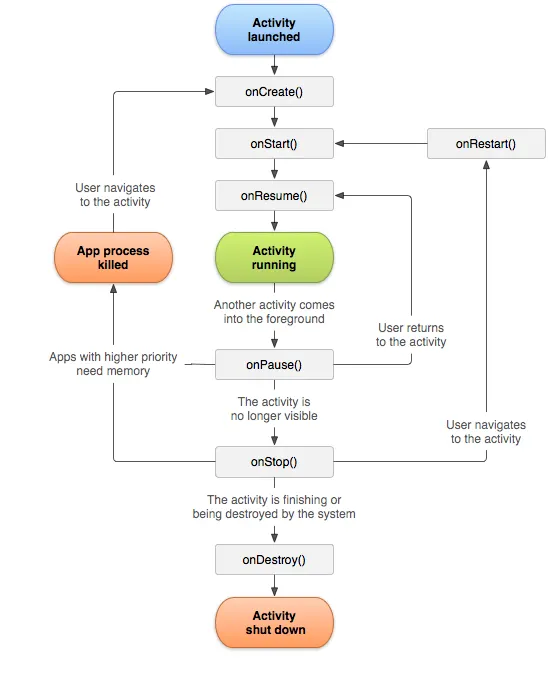
Introduction
- In Android, an Activity represents a single screen with a user interface.
- The Activity Lifecycle refers to the different states an activity goes through from its creation to its destruction.
- Android manages these states using predefined lifecycle methods.
- Understanding the Activity Lifecycle helps developers manage resources properly and build efficient applications.
What is Activity Lifecycle
- The Activity Lifecycle is a sequence of callback methods that are triggered when an activity changes its state.
- These methods are called by the Android system depending on user interaction and system events.
- It ensures proper memory management and smooth switching between activities.
Lifecycle Methods
onCreate()
- It is called when the activity is created for the first time
- It is used to initialize components such as UI elements, variables, and resources required for the activity
- The layout of the activity is usually set using setContentView() in this method
- This method is executed only once during the entire lifecycle of the activity
onStart()
- It is called after the onCreate() method is executed in the activity lifecycle
- In this stage, the activity becomes visible on the screen to the user but is not yet ready for interaction
- It is mainly used to prepare the activity to move into the foreground and become fully active
onResume()
- It is called when the activity comes to the foreground and becomes fully active
- In this state, the user can interact with the activity and perform actions
- It is used to start operations like animations, sensors, or services that need to run while the activity is active
onPause()
- It is called when the activity is partially hidden because another activity comes in front of it
- In this state, the activity is still visible but not in focus and user interaction is paused
- It is used to pause ongoing tasks, save temporary data, and release limited resources
onStop()
- It is called when the activity is completely hidden from the user and no longer visible on the screen
- This happens when another activity fully covers it or the user navigates away from it
- It is used to release heavy resources such as camera, network connections, or background processes
onRestart()
- It is called when a stopped activity is about to start again and come back to the foreground
- It is triggered after onStop() and before onStart()
- It is used to reinitialize components or restore the state of the activity
onDestroy()
- It is called before the activity is destroyed and removed from memory
- It is used to perform final cleanup operations and release all remaining resources
- This method is the final stage of the activity lifecycle
Conclusion
- The Activity Lifecycle consists of multiple methods that manage the different states of an activity.
- Proper handling of lifecycle methods ensures better performance, efficient resource management, and a smooth user experience in Android applications.
Generalized Architecture of Mobile Operating System
Introduction
- Android Architecture is a layered software stack that manages mobile device hardware and software components.
- Each layer performs a specific function and works together to run Android applications efficiently and smoothly.
Explanation of Layers
1. Kernel Layer
- It is the core and lowest layer of Android Architecture.
- It is based on the Linux kernel and acts as a bridge between hardware and software.
- It manages memory, CPU scheduling, power management, process management, and device drivers.
- It also provides security and handles communication with hardware components. 2. Hardware Abstraction Layer (HAL)
- It acts as an interface between hardware components and the Android operating system.
- It hides the complexity of hardware details from the upper software layers.
- It allows Android to run on different hardware devices without making major changes in the system. 3. Middleware
- It provides common services and system libraries required by applications.
- It includes multimedia support, database services, networking, and security services.
- It helps applications communicate with hardware through standard system APIs. 4. Application Framework
- It provides APIs and system services used by developers to build Android applications.
- It manages activities, notifications, resources, and content providers.
- It includes important managers such as Activity Manager, Window Manager, and Resource Manager. 5. User Interface Layer
- It is the topmost layer of the Android Architecture.
- It handles display, screen layout, and user interaction through touch and gestures.
- It includes system applications and user-installed applications.
Conclusion
- Android Architecture follows a structured layered model from Kernel to User Interface.
- Each layer has a specific role, ensuring efficient performance, proper security, and smooth functioning of Android devices.
Explain the Building Blocks of Android Application.
Introduction
- Android applications are built using different components known as building blocks
- These components define how an application works, interacts, and manages data
- Each component has a specific role in the application
Building Blocks of Android Application
1. Activity
- Activity represents a single screen with a user interface
- It is the main entry point for user interaction in an application
- Example: Login screen, Home screen
- Managed using Activity Lifecycle methods
2. View
- View is the basic building block of user interface components
- It represents UI elements such as TextView, Button, EditText, etc.
- Used to display information and handle user interaction
3. Intent
- Intent is a messaging object used to communicate between components
- It is used to start activities, services, or broadcast receivers
- It can also be used to pass data between components
4. Service
- Service is a component that runs in the background without user interface
- Used for long-running operations such as music playback or downloading data
- It continues running even when the app is not in use
5. Content Provider
- Content Provider is used to manage and share data between different applications
- It provides a standard interface to access structured data
- Example: Contacts, media files
6. Fragment
- Fragment is a reusable part of user interface inside an activity
- It helps in creating dynamic and flexible UI
- It works as a small part of a screen within an activity
7. AndroidManifest.xml
- It is a configuration file that contains information about the application
- It declares components, permissions, and app details
- It is required for every Android application
Conclusion
- Building blocks are essential components used to develop Android applications
- Each component has a specific function and works together with others
- Proper use of these components helps in creating efficient and well-structured applications
Features of Android Operating System
1. Open Source Platform
- Android is an open-source operating system which allows developers to modify and customize it
- It provides flexibility to manufacturers and developers to create customized applications and devices
2. User-Friendly Interface
- Android provides a simple and easy-to-use interface
- It supports touch gestures like tap, swipe, and scroll for better user experience
3. Multitasking
- Android allows multiple applications to run at the same time
- Users can switch between apps easily without closing them
4. Connectivity
- Android supports various connectivity options such as Wi-Fi, Bluetooth, GSM, CDMA, and mobile data
- It enables communication, internet access, and data transfer
5. Large Number of Applications
- Android provides access to a wide range of applications through the Play Store
- Users can download apps for entertainment, communication, productivity, and more
6. Multimedia Support
- Android supports audio, video, and image formats
- It allows users to watch videos, listen to music, and view images easily
7. Customization
- Android allows users to customize home screen, themes, widgets, and settings
- It provides high level of personalization
Advantages of Android Operating System
1. Wide Device Availability
- Android is used by many manufacturers like Samsung, Vivo, Oppo, etc.
- It is available in different price ranges from budget to premium devices
2. High Customization
- Users can customize almost every aspect of the device
- Developers can also build customized apps and ROMs
3. Large Developer Community
- Android has a large number of developers worldwide
- This results in continuous updates, support, and availability of apps
4. Integration with Google Services
- Android is well integrated with Google services like Gmail, Google Maps, YouTube, and Google Drive
- It improves productivity and user experience
5. Cost Effective
- Android devices are available at lower cost compared to other operating systems
- It makes smartphones accessible to a large number of users
6. Easy App Development
- Android provides powerful tools like Android Studio and SDK
- Developers can easily build, test, and deploy applications
Constraints of Smart Mobile OS
-
Limited Battery Power
- Mobile phones run on battery
- Battery drains fast
- Heavy apps and games consume more power
-
Limited RAM (Memory)
- Mobile devices have less RAM than computers
- Too many apps make phone slow
- Background apps are closed automatically
-
Limited Storage Space
- Mobile storage is limited
- Apps, photos, videos fill memory quickly
- User needs to delete data often
-
Small Screen Size
- Mobile screens are small
- Limited space to display information
- Not suitable for long work like desktop
-
Limited Processing Power
- Mobile processors are less powerful
- Heavy tasks reduce performance
- Apps must be optimized
Comparison of Mobile Operating Systems
| Feature | Android | iOS | BlackBerry | Windows Mobile | Symbian |
|---|---|---|---|---|---|
| Developer | Apple | BlackBerry | Microsoft | Nokia | |
| Source Type | Open | Closed | Closed | Closed | Open |
| App Store | Play Store | App Store | BB World | Windows Store | Ovi Store |
| Security | Moderate | High | Very High | Moderate | Low |
| Customization | High | Low | Low | Low | Moderate |
| Market Share | High | High | Very Low | Negligible | Obsolete |
Questions
- Define Mobile Operating System.
- State the requirements of a Mobile Operating System.
- List different types of Mobile Operating Systems.
- Write short note on history of Android OS.
- What is Activity Lifecycle?
- Explain constraints of Smart Mobile Operating System.
- Explain generalized architecture of Mobile OS.
- Explain Android Architecture in brief.
- Explain building blocks of Android Application.
- Differentiate between Android OS and iOS.