IOT-01 IoT Communication Protocols & Cloud Platforms
On This Page
IoT system Architecture & Layers
- IoT architecture is structured into multiple layers for efficient operation. At the base, the Perception Layer uses icons like thermometers and sensors to represent raw data collection from the physical world.
- Above it, the Network Layer features connectivity symbols like Wi-Fi and Bluetooth, highlighting how data is securely transmitted.
- The Data Processing Layer follows, depicting cloud storage and AI "brain" icons to represent deep analysis and insight generation.
- Finally, the Application Layer at the top display's user interface elements like dashboards and mobile devices for human interaction. Arrows on the sides clarify the process, showing data flowing upward for analysis and control commands flowing downward for device execution.
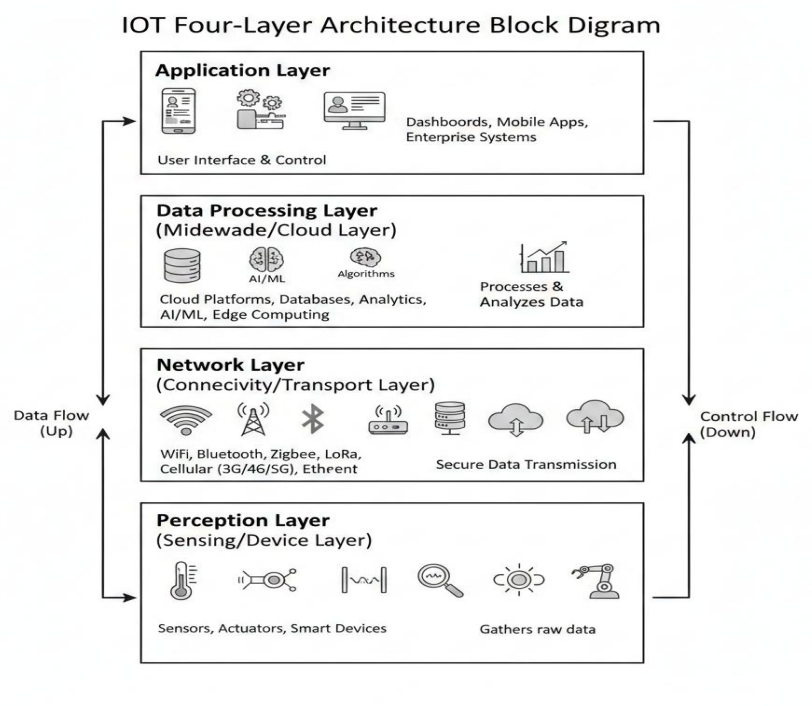
1). Perception Layer:
- Role: Acts as the physical interface to sense environmental changes and convert them into digital signals or perform physical actions.
- The Perception Layer interacts directly with the physical environment. It uses sensors and actuators to detect changes such as temperature, moisture, or motion and converts them into digital signals. It can also perform physical actions based on received commands.
- Example: A soil moisture sensor in a farm measuring water levels and a water valve that opens when triggered.
2). Network Layer:
- Role: Provides secure paths for data transmission between the physical devices and the centralized processing systems.
- The Network Layer is responsible for securely transmitting data from sensors to processing systems. It ensures reliable communication using wired or wireless technologies. This layer acts as the bridge between physical devices and cloud platforms.
- Example: A Wi-Fi router or 5G cellular gateway transmitting sensor data from a remote field to a cloud server.
3). Data Processing Layer:
- Role: Organizes, stores, and analyzes raw data using algorithms to extract meaningful patterns and actionable insights.
- This layer stores, processes, and analyzes large volumes of raw sensor data. It applies algorithms, analytics, and AI models to identify trends and generate actionable insights. The processed data supports decision-making and automation.
- Example: An AI algorithm on AWS/Azure/Thingsboard analyzing moisture trends to predict exactly when a crop will need more water.
4). Application Layer:
- Role: Delivers the final information to the end-user through visual interfaces and allows for manual system control.
- The Application Layer presents processed information to users in a clear and interactive format. It enables monitoring, reporting, alerts, and manual control of the system. This layer directly supports user decisions and actions.
- Example: A smartphone dashboard app where a farmer views soil health charts and clicks a button to start irrigation.
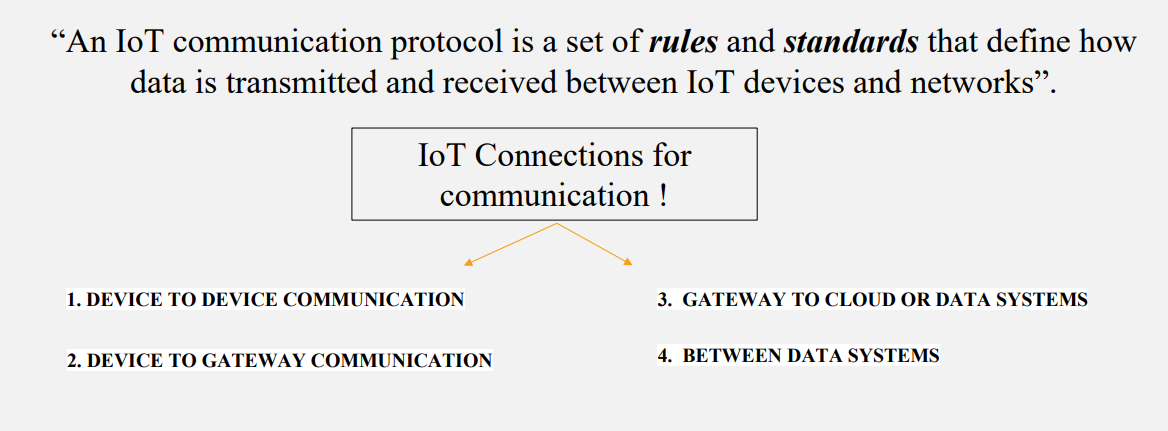
IoT communication protocols
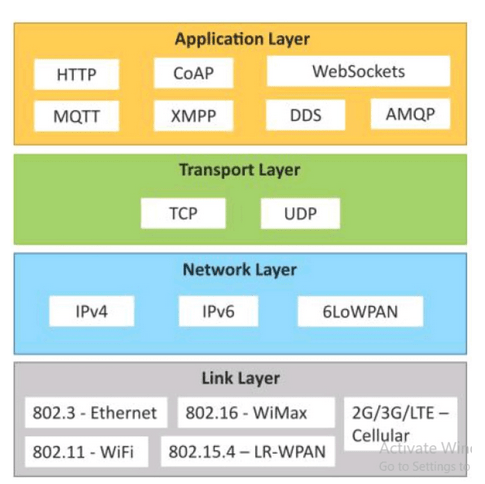
Data-Link Layer Protocols
- The Data-Link Layer enables direct communication between nearby IoT devices. It defines how data is framed, addressed, and transmitted over a physical medium. This layer focuses on short-range connectivity, low power consumption, and device discovery. It is crucial for sensor-to-gateway communication.
Protocols in Data-Link Layer:
- WiFi
- Bluetooth
- Ethernet
- NFC (REID)
- LoRaWAN
Wi-Fi
- Function: Wi-Fi is a wireless protocol used to connect devices to a local area network (LAN) or the internet without cables.
- Example Scenario (Real World): In a smart home, Wi-Fi connects devices like smart thermostats and security cameras to the home network for remote control.
Key Points:
- Frequency Bands: Operates on 2.4 GHz (wider range) and 5 GHz (faster speeds).
- Data Rate: Typical speeds range from 150 Mbps to over 9.6 Gbps, depending on the Wi-Fi standard.
- Range: Indoor range is typically 30-50 meters.
Bluetooth / Bluetooth Low Energy (BLE)
- Function: Bluetooth is used for short-range wireless communication between devices over a short distance.
- Example Scenario (Real World): Bluetooth is commonly used to connect wireless headphones to smartphones or fitness trackers to apps.
Key Points:
- Frequency Band: Operates on the 2.4 GHz ISM band.
- Data Rate: Bluetooth Classic offers up to 3 Mbps, while Bluetooth Low Energy (BLE) is optimized for low power consumption.
- Range: Typically up to IO meters (Bluetooth Classic) or 100 meters (BLE).
Ethernet
- Function: Ethernet provides wired networking, offering high-speed, reliable communication over physical cables.
- Example Scenario (Real World): In offices, Ethernet connects computers and servers for stable and fast communication.
Key Points:
- Speed: Common speeds are 100 Mbps (standard) to I Gbps (Fast Ethernet).
- Reliability: Offers low latency and minimal interference.
- Range: Limited to 100 meters with standard twisted-pair cables.
NFC(RFID)
- Function: NFC (Near Field Communication) / RFID (Radio Frequency Identification) is a short-range wireless communication technology used for identification, authentication, and data exchange between a reader and a tag. It is commonly used where quick, contactless interaction is required. RFID tags can be passive (no battery) or active.
- Example Scenario (Real World): In inventory management, RFID tags attached to products are scanned automatically when items pass through warehouse gates for tracking and stock updates.
Key Points:
- Frequency Band: Operates typically at 13.56 MHz (HF band).
- Data Rate: Up to 424 kbps (NFC).
- Range: Very short range, usually 2—10 cm.
- Power Usage: Passive RFID tags do not require a power source.
LoRAWAN (Long Range Wide Area Network)
- Function: LoRaWAN is a low-power, wide-area networking (LPWAN) protocol designed for long-range communication between IoT devices and gateways. It enables devices to transmit small amounts of data over large distances while consuming minimal power. It is ideal for battery-operated IoT sensors.
- Example Scenario (Real World): In smart agriculture, LoRaWAN sensors transmit soil moisture and temperature data from remote farms to a central server kilometers away.
Key Points:
- Frequency Band: Operates in unlicensed ISM bands (e.g., 868 MHz in Europe, 915 MHz in US).
- Data Rate: Very low, typically 0.3 kbps to 50 kbps.
- Range: Up to 15 km in rural areas and 2—5 km in urban areas.
- Power Usage: Extremely low power, enabling multi-year battery life.
Network Layer Protocols
- The Network Layer is responsible for logical addressing and routing of IoT data across networks. It ensures data packets reach the correct destination, even across different networks. This layer supports scalability and global connectivity for IoT systems.
Protocols in Network Layer:
- IPv4
- IPv6
- 6LoWPAN
IPv4 (Internet Protocol Version 4)
- Function: IPv4 is the fourth version of the Internet Protocol, responsible for routing and addressing packets of data across networks. It uses 32-bit addresses to identify devices on a network.
- Example Scenario (Real World): Most home networks and websites still use IPv4 addresses. For instance, your home router may have an IPv4 address like 192.168.1.1, which helps it route data between your devices and the internet.
Key Points:
- Address Bits: 32-bit address, allowing for approximately 4.3 billion unique addresses.
- Exhaustion: The limited address space has led to IPv4 address exhaustion, necessitating techniques like Network Address Translation (NAT).
- Compatibility: Widely supported and still in use, despite the transition to IPv6.
IPv6 (Internet Protocol Version 6)
- Function: IPv6 is the successor to IPv4, providing a larger address space and better support for modern networks, including IoT. It uses 128-bit addresses, allowing for a vast number of unique IP addresses. Eg. IPv6 addresses are represented in hexadecimal and consist of eight groups of four hexadecimal digits, separated by colons.
- 2001 : 8934 : DB11 : 010A : 12FC : 0370: 0000: 56DE
- Example Scenario (Real World): In smart cities, IPv6 can be used to assign unique addresses to every connected device, such as traffic lights, street cameras, and public Wi-Fi hotspots, enabling efficient management and data collection.
Key Points:
- Address Bits: 128-bit address, allowing for approximately 3.4xlOA38 unique addresses.
- Features: Built-in support for autoconfiguration and better security features (e.g., IPsec).
- Scalability: Designed to accommodate the exponential growth of connected devices, especially in IoT.
6LoWPAN
- Function: LoWAN is designed for long-range communication between low-power IoT devices over large geographic areas. It supports devices that need to send small amounts of data intermittently over a wide area while conserving battery life.
- Example Scenario (Real World): LoWAN is commonly used in smart agriculture for monitoring soil moisture and weather conditions across large fields, where sensors need to transmit data over long distances to a central hub.
Key Points:
- Frequency Bands: Operates in sub-GHz bands (e.g., 868 MHz in Europe, 915 MHz in the US).
- Data Rate: Typically low, ranging from 0.3 kbps to 50 kbps, optimized for energy efficiency and long-range communication.
- Range: Can reach up to 15-20 kilometers in rural areas and 2-5 kilometers in urban areas.
Transport Layer Protocols
- The Transport Layer enables end-to-end communication between IoT devices and servers. It ensures that data is transferred accurately between the source and destination using appropriate control mechanisms. This layer handle's reliability, error detection, data flow regulation, and congestion control. Based on application requirements, it can support either reliable data delivery or fast, low-latency communication.
Protocols Used in Transport Layer:
- TCP (Transmission Control Protocol)
- UDP (User Datagram Protocol)
Transport Layer Protocol (TCP-Transmission Control Protocol)
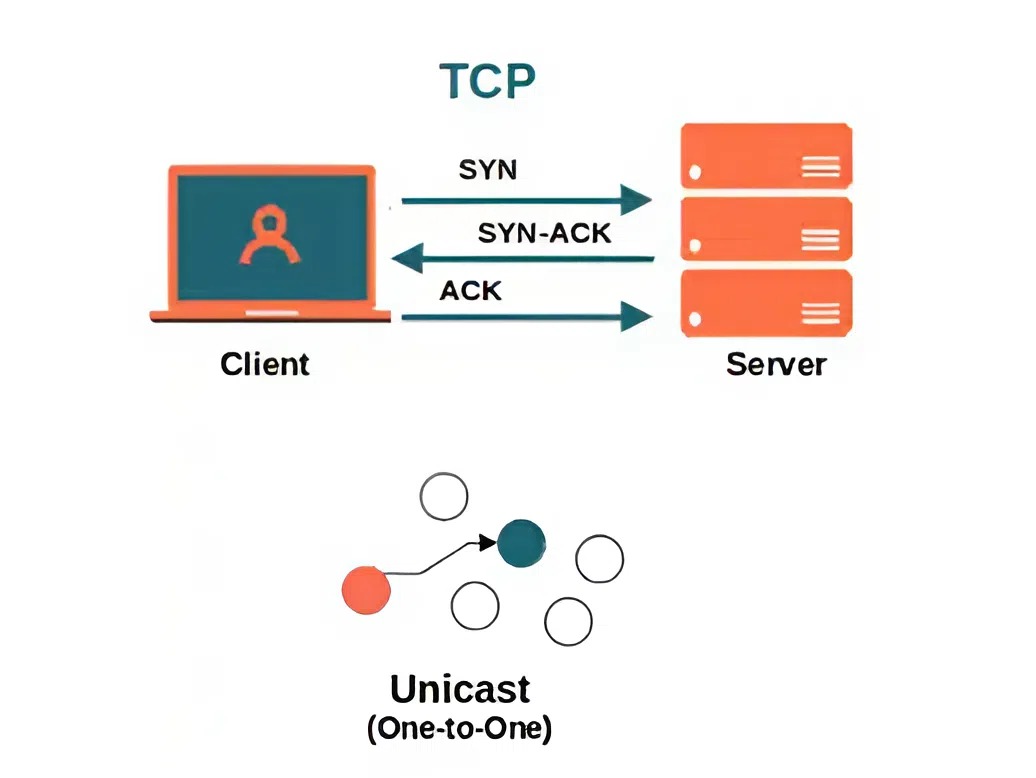
- Function: TCP is a connection-oriented protocol that ensures reliable, ordered, and error-checked delivery of data between applications. It establishes a connection between sender and receiver before transmitting data and ensures that all packets arrive correctly and in order.
- Example Scenario (Real World): When you download a file from a website or stream a video, TCP is used to ensure that all parts of the file or video arrive correctly and in the right sequence, providing a smooth and error-free experience.
Key Points:
- Connection-Oriented: Establishes a connection before data transfer and ensures reliability.
- Data Integrity: Provides error checking and guarantees data is received in the correct order.
- Data Rate: The data rate is dependent on network conditions and can vary. TCP itself does not specify a data rate; it's about ensuring reliable delivery.
Transport Layer Protocol (UDP-User Datagram Protocol)
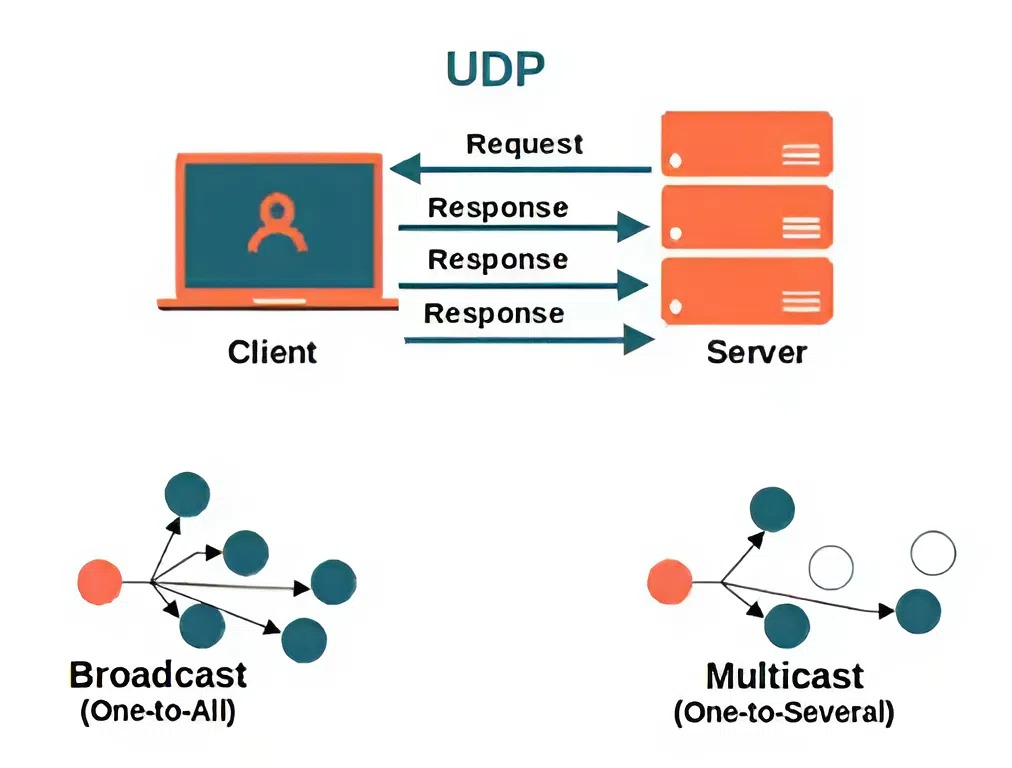
- Function: UDP is a connectionless protocol that allows applications to send messages (datagrams) without establishing a connection first. It provides a faster but less reliable method of communication compared to TCP. It does not guarantee delivery, ordering, or error checking.
- Example Scenario (Real World): UDP is used in real-time applications like online gaming or video conferencing where low latency is crucial, and occasional data loss is acceptable. For instance, in a live video call, UDP helps transmit video and audio quickly, even if some packets are lost.
Key Points:
- Connectionless: No connection is established before data transfer, leading to lower latency.
- No Reliability: Does not guarantee delivery, order, or error checking. Packets may be lost or received out of order.
- Data Rate: The data rate can be higher due to lower overhead compared to TCP, but it depends on the application and network conditions.
Application Layer Protocols
- The Application Layer acts as the interface between IoT devices, the network, and end users. It defines how data is formatted, exchanged, and interpreted between software applications. This layer enables communication through application-level protocols and directly supports user dashboards, alerts, monitoring, and automation logic.
Protocols Used in Application Layer:
- HTTP
- MQTT
- CoAP
HTTP (Hypertext Transfer Protocol)
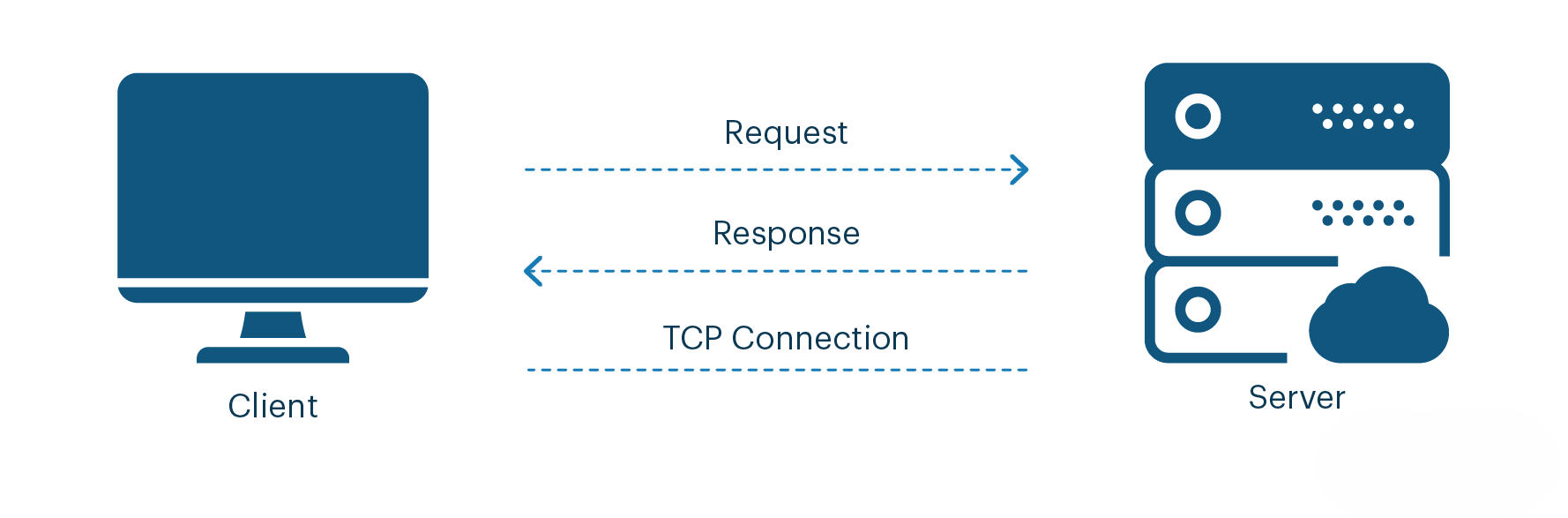
- Function: HTTP is an application-layer protocol used for communication between IoT devices and web servers using a request–response model. It enables devices to send data to cloud platforms and retrieve responses using standard web technologies. HTTP is widely adopted due to its simplicity and compatibility with existing internet infrastructure.
- Example Scenario (Real World): An IoT weather monitoring system sends temperature and humidity data to a cloud server using HTTP APIs, which is then displayed on a web dashboard.
Key Points:
- Communication Model: Client—Server (Request—Response)
- Transport Protocol: Runs over TCP
- Data Format: JSON, XML, HTML
- Power Usage: High compared to lightweight IoT protocols
MQTT (Message Queuing Telemetry Transport)
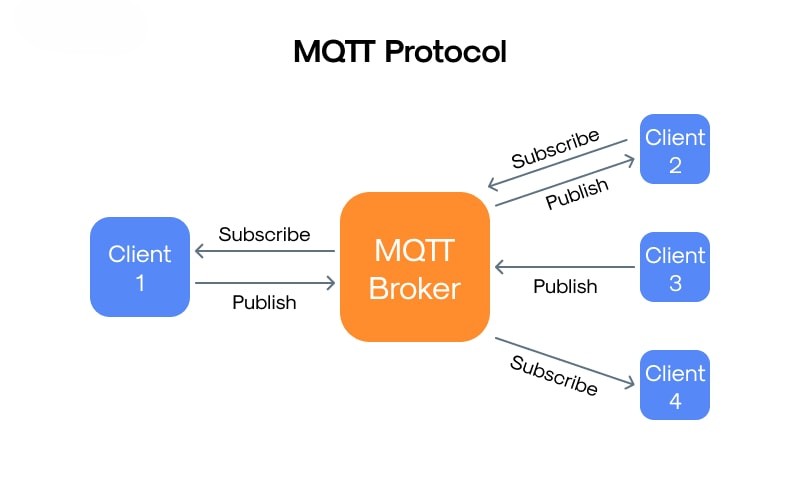
- Function: MQTT is a lightweight application-layer messaging protocol designed for low-bandwidth and unreliable networks. It uses a publish–subscribe model to efficiently distribute data between devices. MQTT is ideal for battery-powered and resource-constrained IoT devices.
- Example Scenario (Real World): In smart agriculture, soil moisture sensors publish data to an MQTT broker, and a farmer’s mobile app subscribes to receive real-time updates.
Key Points:
- Communication Model: Publish—Subscribe
- Transport Protocol: Runs over TCP
- Data Overhead: Very low
- Reliability: Supports Quality of Service (QoS) levels 0, 1, and 2
CoAP (Constrained Application Protocol)
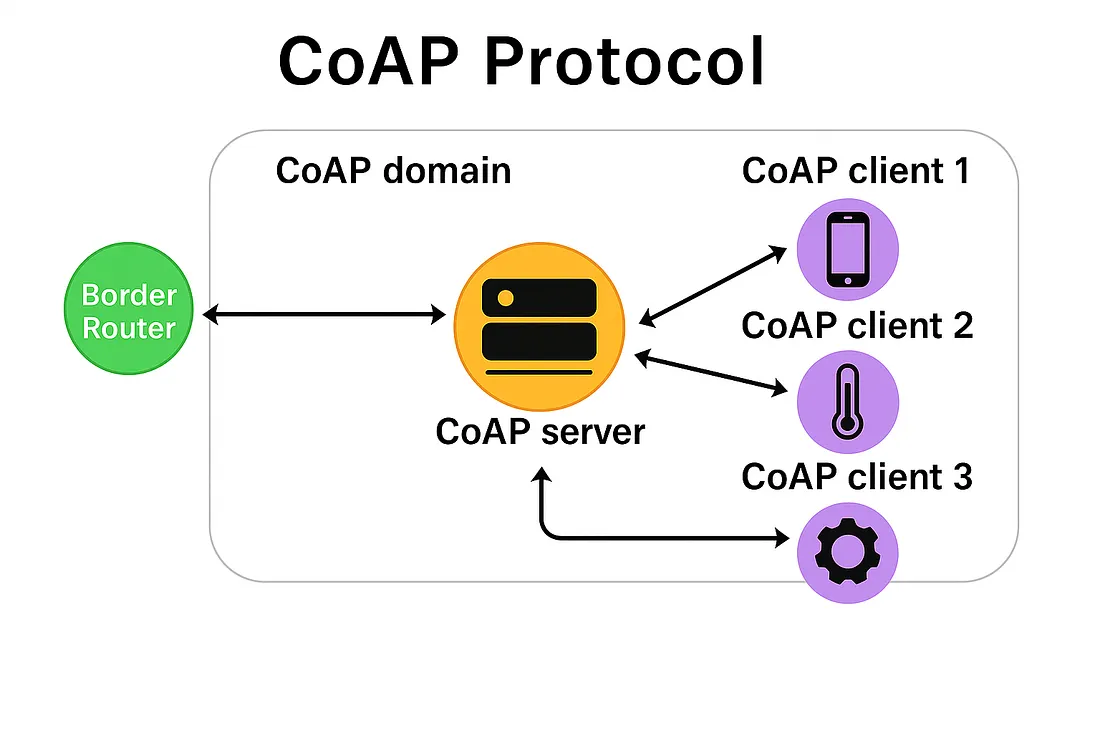
- Function: CoAP is a lightweight application-layer protocol designed specifically for constrained IoT devices and networks. It provides RESTful communication similar to HTTP but with much lower overhead. CoAP is optimized for low power consumption and small data packets.
- Example Scenario (Real World): A smart lighting system uses CoAP to turn lights ON or OFF over a low-power wireless sensor network.
Key Points:
- Communication Model: Request—Response (REST-based)
- Transport Protocol: Runs over UDP
- Data Overhead: Very low
- Designed For: Low-power and constrained IoT devices
IoT Cloud Platforms
- A cloud platform in IoT is an internet-based environment that collects, stores, and processes data generated by IoT devices. It enables device management, real-time analytics, and remote monitoring while providing scalable storage and computing resources for IoT applications.
- "Cloud platforms form the backbone of IoT ecosystems by enabling scalable data storage, real-time analytics, device management, and intelligent decision-making."
Types of Cloud Platforms
1). Private Cloud
- Definition: A private cloud is dedicated to a single organization and is not shared with others. It offers greater control, customization, and security. It can be hosted on-premises or by a third party.
- IoT Context Example: Used in industrial IoT where sensitive production data must remain internal.
2).Public Cloud
- Definition: A public cloud is owned and operated by a cloud service provider and shared among multiple users. It offers high scalability, pay-as-you-go pricing, and easy accessibility over the internet.
- IoT Context Example: Smart home and smart city applications using cloud services for data analytics.
3). Hybrid Cloud
- Definition: A hybrid cloud combines private and public clouds, allowing data and applications to be shared between them. It provides flexibility, scalability, and enhanced security.
- IoT Context Example: Critical IoT data stored in private cloud, while analytics runs on public cloud.
4). Community Cloud
- Definition: A community cloud is shared by multiple organizations with similar requirements, such as security or compliance needs. It is managed jointly or by a third party.
- IoT Context Example: Healthcare organizations sharing IoT data infrastructure for medical monitoring systems.
Few Cloud Platforms
1). Amazon Web Services (AWS IoT) Uniqueness / Strengths:
- Highly scalable and reliable cloud infrastructure.
- Strong IoT security with fine-grained access control.
- Deep integration with analytics, AI, and serverless services.
- Suitable for large-scale industrial and commercial IoT systems.
2). Microsoft Azure (Azure IoT Hub) Uniqueness / Strengths:
- Excellent integration with enterprise IT systems.
- Built-in digital twins for modeling real-world IoT environments.
- Strong support for hybrid cloud and edge computing.
- Preferred for smart cities and enterprise IoT solutions.
3). Google Cloud (Google Cloud IoT) Uniqueness / Strengths:
- Powerful big-data analytics and machine learning capabilities.
- High-performance real-time data processing.
- Best suited for data-intensive IoT applications.
- Strong visualization and Al-driven insights.
4). Google Cloud (Google Cloud IoT) Uniqueness / Strengths:
- Open-source and cost-effective IoT platform.
- Easy device management and customizable dashboards.
- Rule engine for automation without heavy coding.
- Popular in academic projects and small-to-medium deployments.
5). IBM Watson IoT Uniqueness / Strengths:
- Al-driven analytics and cognitive computing.
- Strong focus on industrial IoT and asset management.
- Enterprise-grade security and data governance.
- Used in manufacturing, logistics, and energy sectors.
6). Ubidots Uniqueness / Strengths:
- Cloud platform focused on rapid IoT application development with minimal coding.
- Provides easy device integration using HTTP, MQTT, and industrial protocols.
- Offers powerful dashboards, widgets, and real-time data visualization.
- Built-in event rules and alerts for automation and notifications.
- Highly suitable for small to medium IoT projects, startups, and education.
Role of Cloud Platforms
- Provide scalable storage and computing power to handle massive IoT data.
- Enable secure device connectivity and management for millions of devices.
- Support real-time data processing, analytics, and visualization.
- Allow remote monitoring and control of IoT systems from anywhere.
- Integrate AI/ML services for predictive analysis and intelligent automation.
- Reduce infrastructure cost through pay-as-you-use models.
Device-to-cloud integration & workflows
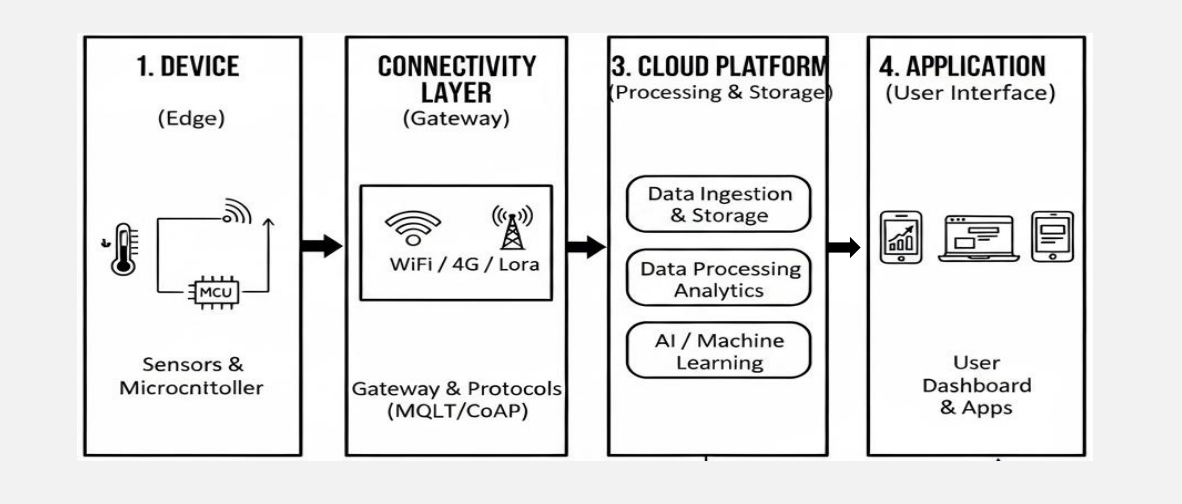
1). Data Generation & Collection
- IoT sensors and devices collect real-world data such as temperature, humidity, or pressure.
- Data may be preprocessed locally to reduce noise or size.
2). Data Transmission
- Devices transmit data using communication technologies like Wi-Fi, LoRaWAN, or cellular networks.
- Devices transmit data using communication technologies like Wi-Fi, LoRaWAN, or cellular networks.
3). Cloud Data Ingestion & Processing
- Cloud platforms receive and authenticate device data.
- Data is stored, analyzed, and processed using analytics or AI services.
4). Visualization & Control
- Processed data IS ISP aye on s oar s or user monitoring.
- Control commands or alerts are sent back to devices when required.
Edge & Fog Computing Basics
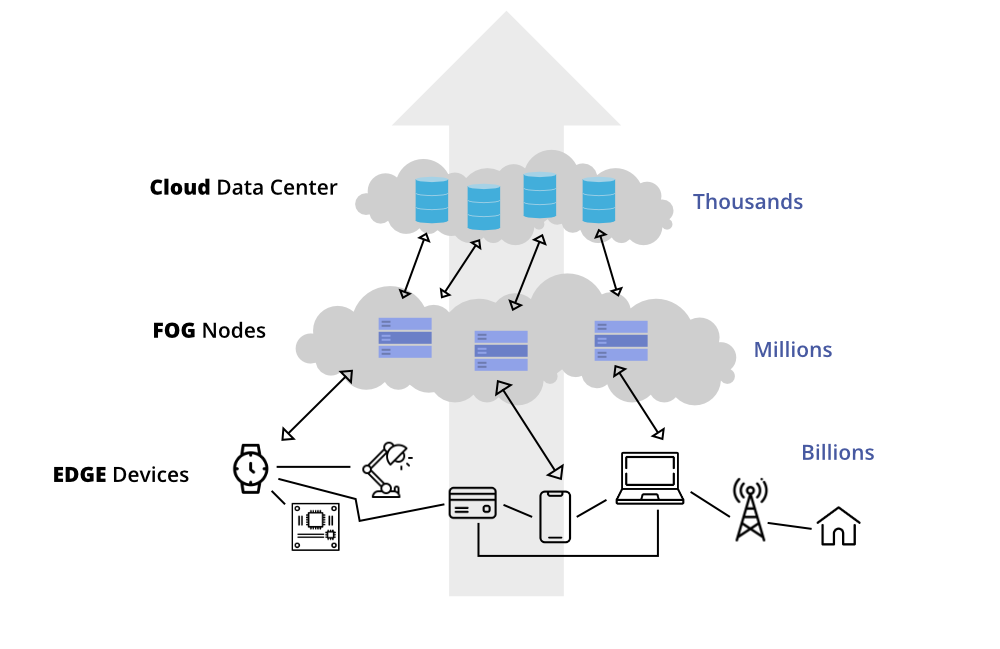
- Edge Computing → Device-level processing
- Fog Computing → Gateway / Local server processing
- Cloud Computing → Centralized processing
Edge Computing
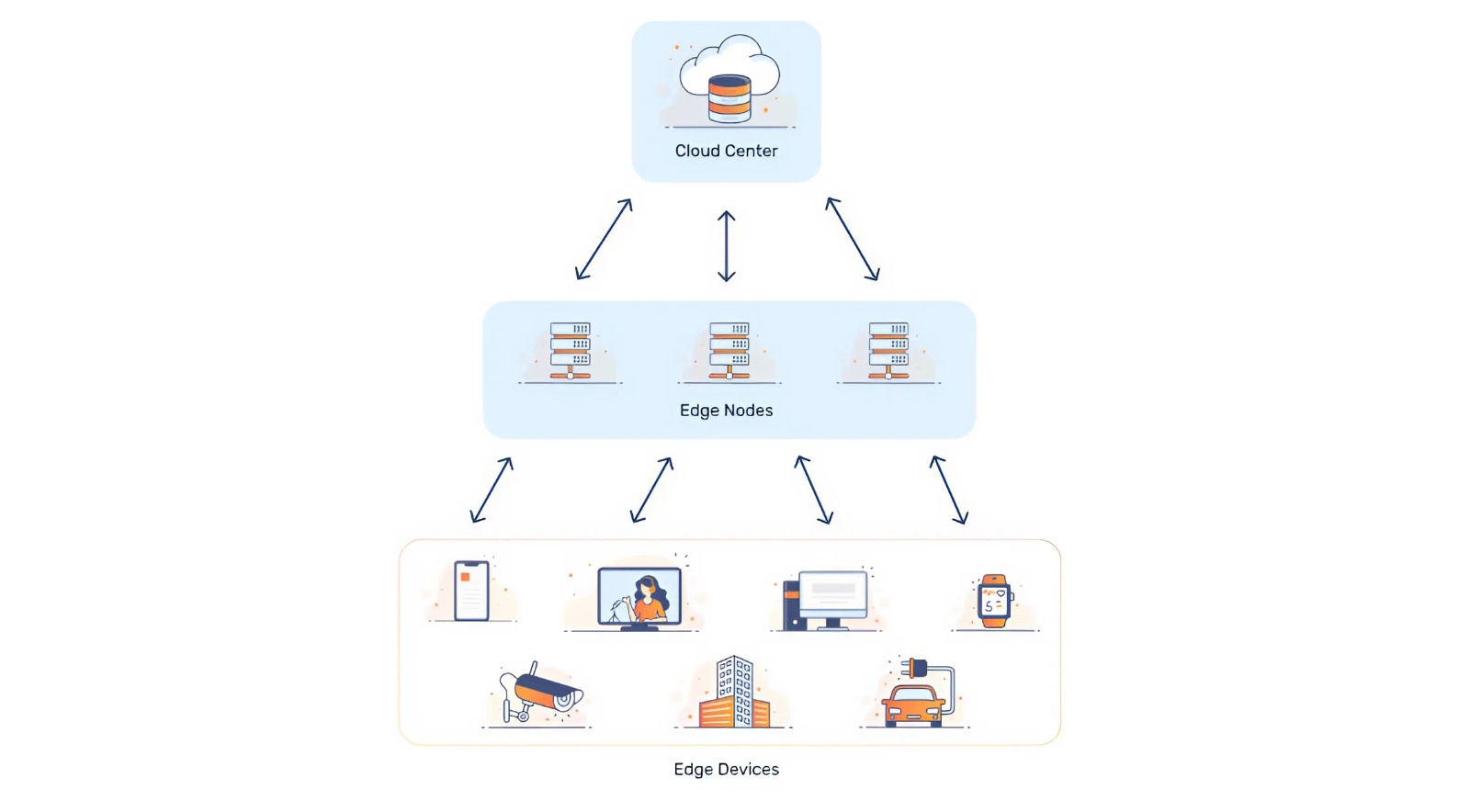
- Definition: Edge computing is a computing paradigm where data processing is performed close to the data source (IoT devices or sensors) instead of sending all data to a centralized cloud.
- Description: In IoT systems, edge computing processes data directly on devices such as sensors, gateways, or local controllers. This reduces latency, bandwidth usage, and dependency on cloud connectivity. It is especially useful for real-time IoT applications that require immediate responses.
- Real-World Example: In autonomous vehicles, sensor data from cameras and LiDAR is processed at the vehicle (edge) to make instant driving decisions without relying on the cloud.
Fog Computing
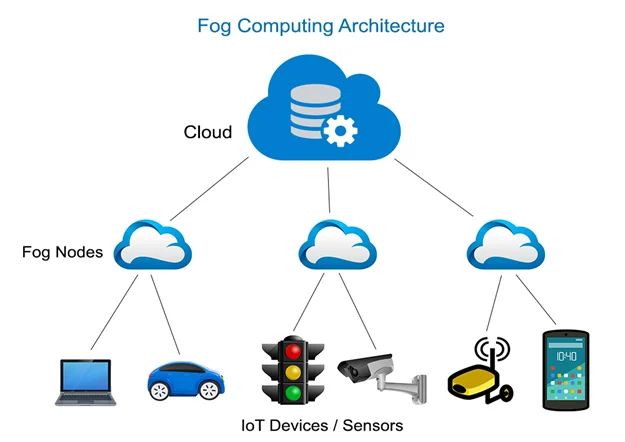
- Definition: Fog computing is a distributed computing model that extends cloud computing by placing processing, storage, and networking services between the cloud and edge devices.
- Description: In IoT ecosystems, fog computing acts as an intermediate layer that aggregates and processes data from multiple edge devices. It reduces cloud load, improves response time, and supports large-scale IoT deployments. Fog nodes are typically routers, gateways, or local servers.
- Real-World Example: In smart cities, traffic sensors send data to nearby fog nodes at intersections to control traffic lights in real time, while summarized data is sent to the cloud for long-term analysis.