CN01-Basic of Networks
On This Page
Introduction
- A computer network is a group of computers linked to each other that enables the computer to communicate with another computer and share their resources, data, and applications.
- Computer networking refers to interconnected computing devices that can exchange data and share resources with each other.
Advantages
- Resource Sharing: Allows multiple users to access and utilize the same resources like printers, files, and software
- Centralized Management: Data and resources can be managed from a central location, simplifying administration and security.
- Improved Communication and Collaboration: Facilitates faster and more efficient communication and collaboration among users.
- Cost Reduction: Reduces the need for individual hardware and software licenses, leading to overall cost savings.
- Increased Flexibility and Scalability: Networks can be easily expanded or modified to accommodate changing needs.
- Centralized Data Management: Data can be stored and managed in a central location, improving data consistency and security.
- Enhanced Security: Advanced security measures can be implemented to protect sensitive data and resources.
Disadvantages
- High Initial Cost: Setting up a computer network can be expensive due to the cost of hardware, software, and installation.
- Security Risks: Networks are susceptible to various security threats like viruses, malware, and hacking attempts.
- Dependence on Infrastructure: Network failures or downtime can disrupt operations and lead to loss of productivity.
- Complexity: Managing and maintaining a complex network requires specialized knowledge and expertise.
- Potential for Data Loss: In case of system failures, data loss can occur if backups are not properly maintained.
- Vulnerability to Viruses and Malware: Viruses and malware can spread rapidly through a network, potentially affecting all connected devices.
OSI Model
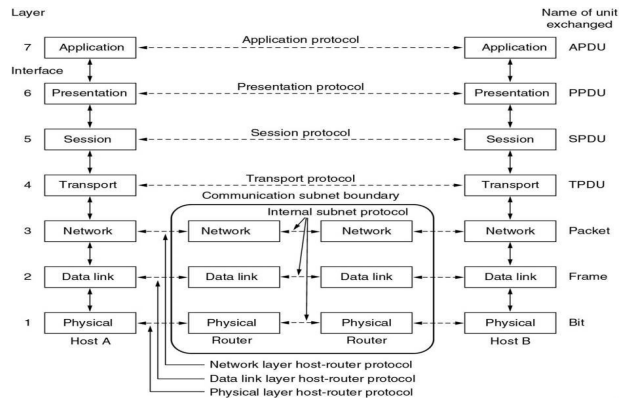
- International standard organization (ISO) established a committee in 1977 to develop an architecture for computer communication.
- Open Systems Interconnection (OSI) reference model is the result of this effort.
- In 1984, the Open Systems Interconnection (OSI) reference model was approved as an international standard for communications architecture.
- Term “open” denotes the ability to connect any two systems which conform to the reference model and associated standards.
- The OSI model is now considered the primary Architectural model for inter-computer communications.
- The OSI model describes how information or data makes its way from application programmes (such as spreadsheets) through a network medium (such as wire) to another application programme located on another network.
- The OSI reference model divides the problem of moving information between computers over a network medium into seven smaller and more manageable problems
- This separation into smaller more manageable functions is known as layering
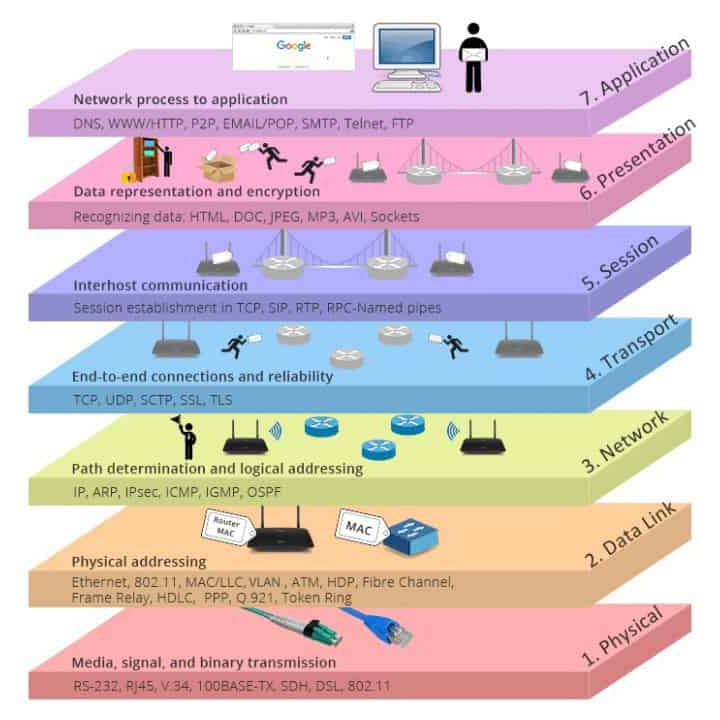
- The process of breaking up the functions or tasks of networking into layers reduces complexity.
- Each layer provides a service to the layer above it in the protocol specification.
- Each layer communicates with the same layer’s software or hardware on other computers.
- The lower 4 layers (transport, network, data link and physical —Layers 4, 3, 2, and 1) are concerned with the flow of data from end to end through the network.
- The upper four layers of the OSI model (application, presentation and session— Layers 7, 6 and 5) are orientated more toward services to the applications.
- Data is Encapsulated with the necessary protocol information as it moves down the layers before network transit.
Physical Layer
- Provides physical interface for transmission of information.
- Defines rules by which bits are passed from one system to another on a physical communication medium.
- Covers all- mechanical, electrical, functional and procedural aspects for physical communication.
- Such characteristics as voltage levels, timing of voltage changes, physical data rates, maximum transmission distances, physical connectors, and other similar attributes are defined by physical layer specifications.
Data Link Layer
- Data link layer attempts to provide reliable communication over the physical layer interface.
- Breaks the outgoing data into frames and reassemble the received frames.
- Create and detect frame boundaries.
- Handle errors by implementing an acknowledgement and retransmission scheme.
- Implement flow control.
- Supports points-to-point as well as broadcast communication.
- Supports simplex, half-duplex or full-duplex communication.
- The data link layer provides:
- Link establishment and termination: establishes and terminates the logical link between two nodes.
- Frame traffic control: tells the transmitting node to "back-off" (stop) when no frame buffers are available.
- Frame sequencing: transmits/receives frames sequentially.
- Frame acknowledgment: provides/expects frame acknowledgments. Detects and recovers from errors that occur in the physical layer by retransmitting non-acknowledged frames and handling duplicate frame receipt.
- Frame delimiting: creates and recognizes frame boundaries.
- Frame error checking: checks received frames for integrity.
- Media access management: determines when the node "has the right" to use the physical medium.
Network Layer
- Implements routing of frames (packets) through the network.
- Defines the most optimum path the packet should take from the source to the destination
- Defines logical addressing so that any endpoint can be identified.
- Handles congestion in the network.
- Facilitates interconnection between heterogeneous networks (Internetworking).
- The network layer also defines how to fragment a packet into smaller packets to accommodate different media.
- The network layer provides:
- Routing: routes frames among networks.
- Subnet traffic control: routers (network layer intermediate systems) can instruct a sending station to "throttle back" its frame transmission when the router's buffer fills up.
- Frame fragmentation: if it determines that a downstream router's maximum transmission unit (MTU) size is less than the frame size, a router can fragment a frame for transmission and re- assembly at the destination station.
- Logical-physical address mapping translates logical addresses or names, into physical addresses.
- Subnet usage accounting: has accounting functions to keep track of frames forwarded by subnet intermediate systems, to produce billing information.
Transport Layer
- Purpose of this layer is to provide a reliable mechanism for the exchange of data between two processes in different computers.
- The transport layer ensures that messages are delivered error-free, in sequence, and with no losses or duplications. It relieves (release) the higher layer protocols from any concern with the transfer of data between them and their peers.
- The size and complexity of a transport protocol depend on the type of service it can get from the network layer. For a reliable network layer with virtual circuit capability, a minimal transport layer is required. If the network layer is unreliable and/or only supports datagrams, the transport protocol should include extensive error detection and recovery.
- The transport layer provides:
- Message segmentation: accepts a message from the (session) layer above it, splits the message into smaller units (if not already small enough), and passes the smaller units down to the network layer. The transport layer at the destination station reassembles the message.
- Message acknowledgment: provides reliable end-to-end message delivery with acknowledgments.
- Message traffic control: tells the transmitting station to "back-off" when no message buffers are available.
- Typically, the transport layer can accept relatively large messages, but there are strict message size limits imposed by the network (or lower) layer. Consequently, the transport layer must break up the messages into smaller units, or frames, prepending a header to each frame.
- The transport layer header information must then include control information, such as message start and message end flags, to enable the transport layer on the other end to recognize message boundaries.
- In addition, if the lower layers do not maintain sequence, the transport header must contain sequence information to enable the transport layer on the receiving end to get the pieces back together in the right order before handing the received message up to the layer above.
Session Layer
- Session layer provides mechanism for controlling the dialogue between the two end systems. It defines how to start, control and end conversations (called sessions) between applications.
- This layer requests for a logical connection to be established on an end-user’s request.
- Any necessary log-on or password validation is also handled by this layer.
- Session layer is also responsible for terminating the connection.
- This layer provides services like dialogue discipline which can be full duplex or half duplex.
- Session layer can also provide check-pointing mechanism such that if a failure of some sort occurs between checkpoints, all data can be retransmitted from the last checkpoint.
Presentation Layer
- Presentation layer defines the format in which the data is to be exchanged between the two communicating entities.
- Also handles data compression and data encryption (cryptography).
- The presentation layer formats the data to be presented to the application layer. It can be viewed as the translator for the network. This layer may translate data from a format used by the application layer into a common format at the sending station, then translate the common format to a format known to the application layer at the receiving station.
- The presentation layer provides:
- Character code translation: for example, ASCII to EBCDIC.
- Data conversion: bit order, CR-CR/LF, integer-floating point, and so on.
- Data compression reduces the number of bits that need to be transmitted on the network.
- Data encryption: encrypt data for security purposes. For example, password encryption.
Application Layer
- Application layer interacts with application programs and is the highest level of OSI model.
- Application layer contains management functions to support distributed applications.
- Examples of application layer are applications such as file transfer, electronic mail, remote login etc.
- The application layer serves as the window for users and application processes to access network services.
- This layer contains a variety of commonly needed functions:
- Resource sharing and device redirection
- Remote file access
- Remote printer access
- Inter-process communication
- Network management
- Directory services
- Electronic messaging (such as mail)
- Network virtual terminals
TCP/IP Model
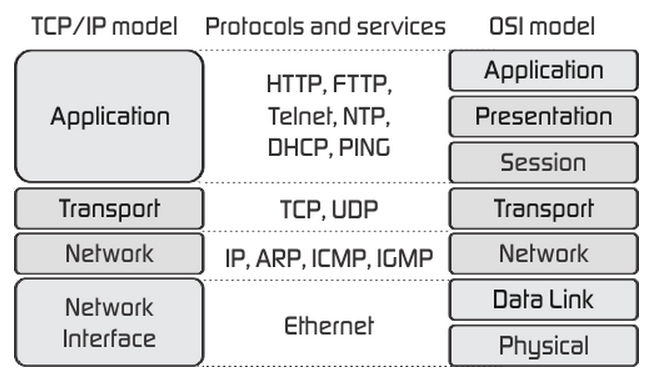
- Transmission Control Protocol/Internet Protocol (TCP/IP) protocol suite is the engine for the Internet and networks worldwide.
- TCP/IP either combines several OSI layers into a single layer or does not use certain layers at all.
- TCP/IP is a set of protocols developed to allow cooperating computers to share resources across the network.
- The TCP/IP model has five layers.
- Application Layer
- Transport Layer
- Internet Layer
- Data Link Layer
- Physical Network
- The Network Access Layer in the TCP/IP model combines the functions of Data link Layer and Physical Layer.
Application Layer
- The application layer is the topmost layer of the four-layer TCP/IP model.
- The application layer is present on the top of the Transport layer.
- Application layer defines TCP/IP application protocols and how host programs interface with Transport layer services to use the network.
- Application layer includes all the higher-level protocols like DNS (Domain Naming System), HTTP (Hypertext Transfer Protocol), Telnet, SSH, FTP (File Transfer Protocol), TFTP (Trivial File Transfer Protocol), SNMP (Simple Network Management Protocol), SMTP (Simple Mail Transfer Protocol), DHCP (Dynamic Host Configuration Protocol), X Windows, RDP (Remote Desktop Protocol) etc.
Transport Layer
- The purpose of the Transport layer is to permit devices on the source and destination hosts to carry on a conversation.
- Transport layer defines the level of service and status of the connection used when transporting data.
- The transport layer provides the end-to-end data transfer by delivering data from an application to its remote peer.
- The most-used transport layer protocol is the Transmission Control Protocol (TCP), which provides:
- Reliable delivery data
- Duplicate data suppression
- Congestion control
- Flow control
- Another transport layer protocol is the User Datagram Protocol (UDP), which provides:
- Connectionless
- Unreliable
- UDP is used by applications that need a fast transport mechanism and can tolerate the loss of some data
Network Layer (Internet Layer)
- The internet layer also called the network layer.
- Internet layer pack data into data packets known as IP datagrams, which contain source and destination address (logical address or IP address) information that is used to forward the datagrams between hosts and across networks.
- The Internet layer is also responsible for the routing of IP datagrams.
- Internet Protocol (IP) is the most important protocol in this layer.
- It is a connectionless protocol that does not assume reliability from lower layers. IP does not provide reliability, flow control or error recovery.
- IP provides a routing function that attempts to deliver transmitted messages to their destination.
- These message units in an IP network are called an IP datagram.
- Example: IP, ICMP, IGMP, ARP, and RARP.
Network Interface Layer (Network Access Layer)
- Network Access Layer defines details of how data is physically sent through the network, including how bits are electrically or optically signalled by hardware devices that interface directly with a network medium, such as coaxial cable, optical fiber, or twisted pair copper wire.
- The protocols included in Network Access Layer are Ethernet, Token Ring, FDDI, X.25, Frame Relay etc
Difference: OSI Model & TCP/IP Model
| OSI | TCP/IP |
|---|---|
| It has 7 layers | It has 4 layers |
| OSI provides layer functioning and also defines functions of all the layers. | TCP/IP model is more based on protocols and protocols are not flexible with other layers. |
| In the OSI model, the transport layer guarantees the delivery of packets | In the TCP/IP model, the transport layer does not guarantee delivery of packets. |
| Follows horizontal approach | Follows a vertical approach. |
| OSI model has a separate presentation layer | TCP/IP doesn’t have a separate presentation layer |
| OSI is a general model. | TCP/IP model cannot be used in any other application. |
| The network layer of the OSI model provides both connection-oriented and connectionless service. | The Network layer in the TCP/IP model provides connectionless service. |
| OSI model has a problem of fitting the protocols in the model | TCP/IP model does not fit any protocol |
| Protocols are hidden in the OSI model and are easily replaced as the technology changes. | In TCP/IP replacing protocol is not easy. |
| OSI model defines services, interfaces, and protocols very clearly and makes a clear distinction between them. | In TCP/IP, it is not clearly separated its services, interfaces, and protocols |
Centralized Network
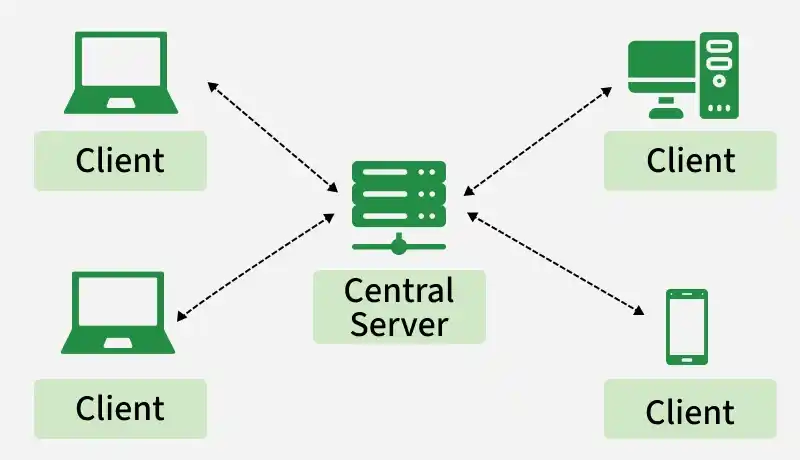
- A centralized network is a network architecture in which the major processing, data storage, management, or decision-making functions are controlled by a central server or central system.
- The connected client devices generally depend on the central system for accessing resources and services.
How It Works
- Clients send requests to the central server.
- The central server processes the requests.
- The server provides the required data or service.
- Centralized administration manages users, resources, and security.
Examples
- Traditional client-server applications
- Centralized database systems
- Banking systems with centralized servers
- Domain-based organizational networks
- Centralized file servers
Advantages
- Centralized Management: Network resources and users can be managed from one central location.
- Easy Security Administration: Security policies, authentication, and access permissions can be centrally controlled.
- Centralized Data Management: Data can be stored and maintained at a central location.
- Simplified Backup: Centralized data makes backup and recovery easier to manage.
- Consistency: Central control can help maintain consistent data and policies across clients.
- Easy Monitoring: Administrators can monitor users, systems, and network resources from a central point.
Disadvantages
- Single Point of Failure: Failure of the central server can make dependent services unavailable.
- Performance Bottleneck: A large number of client requests can overload the central server.
- Dependence on Central Server: Clients may be unable to access important resources if the central system is unavailable.
- Scalability Challenges: Increasing the number of clients may require significant upgrades to the central infrastructure.
- Higher Impact of Server Attacks: Compromise of the central server can affect many users and resources.
Decentralized Network
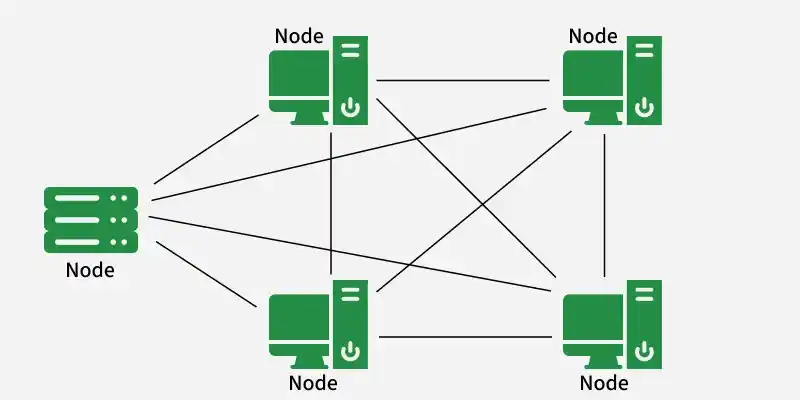
- A decentralized network is a network architecture in which control, processing, storage, or decision-making is distributed among multiple interconnected systems or nodes rather than being controlled by one central system.
- Individual nodes may perform services or make decisions independently.
How It Works
- Multiple nodes participate in providing network services.
- Processing and/or data can be distributed among different nodes.
- Nodes can communicate directly or through other nodes.
- Failure of one node does not necessarily stop the entire network.
Examples
- Peer-to-peer (P2P) networks
- Distributed computing systems
- Some blockchain networks
- Distributed databases
- Certain content distribution architectures
Advantages
- No Single Central Point of Failure: Failure of one node does not necessarily bring down the entire system.
- Improved Fault Tolerance: Services may continue through other available nodes.
- Better Distribution of Load: Processing and communication can be distributed across multiple systems.
- Scalability: Additional nodes can potentially contribute processing, storage, or communication capacity.
- Greater Autonomy: Individual nodes can perform certain functions without depending completely on a central server.
Disadvantages
- Complex Management: Managing multiple independent or semi-independent nodes can be difficult.
- Security Challenges: Maintaining consistent security policies across many nodes can be more complicated.
- Data Consistency Problems: Distributed copies of data may require synchronization mechanisms.
- Complex Troubleshooting: Identifying failures can be more difficult because there is no single control point.
- Higher Coordination Requirements: Nodes may need protocols to coordinate communication, synchronization, and resource sharing.
Difference: Centralized & Decentralized
| Basis | Centralized Network | Decentralized Network |
|---|---|---|
| Control | Mainly controlled by a central system | Distributed among multiple nodes |
| Architecture | Central server/client-oriented | Distributed or peer-oriented |
| Central Server | Usually present | Not required |
| Decision Making | Mainly performed centrally | Distributed among nodes |
| Data Management | Often concentrated at a central location | Distributed across multiple nodes |
| Failure | Central failure can affect many services | Failure of one node may have limited impact |
| Fault Tolerance | Relatively lower if redundancy is absent | Generally higher when multiple nodes provide redundancy |
| Management | Easier to manage centrally | More complex to manage |
| Security Administration | Easier to enforce centrally | More difficult to coordinate consistently |
| Scalability | Can become dependent on central capacity | Capacity can often be expanded by adding nodes |
| Performance | Central server can become a bottleneck | Workload can be distributed |
| Data Consistency | Easier to maintain centrally | Synchronization may be required |
| Cost | Central infrastructure may be significant | Infrastructure is distributed |
| Example | Centralized database server | Peer-to-peer network |
Peer-to-Peer Network (P2P)
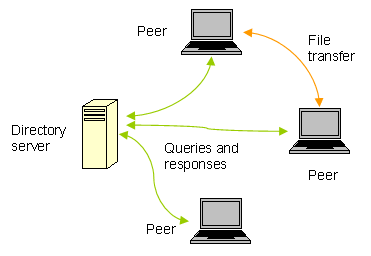
- In this network group of computers is connected together so that users can share resources and information.
- There is no central location (server) for authenticating users, storing files, or accessing resources and each of them works as both client and server.
- This means that users must remember which computers in the workgroup have the shared resource or information that they want to access
- Advantages:
- It is easy to setup.
- There is no need of any committed server as each peer acts as both server and client.
- The network implementation is quite cheap.
- The resources of a peer can be shared with other peers very easily in the network
- Disadvantages:
- The speed of the network decreases due to heavy usage.
- It is not easy to keep track of information on each computer.
- There is no central backup of files and folders.
- Network and data security are weak
Client-Server Network (CS)
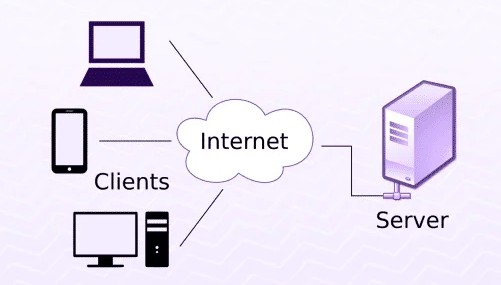
- A client/server network is a system where one or more computers called clients connect to a central computer named as server to share or use resources.
- The client requests a service from server, which may include running an application, querying database, printing a document, performing a backup or recovery procedure.
- The request made by the client is handled by server.
- A client/server network is that in which the files and resources are centralized. This means that the server can hold them and other computers (Client) can access them.
- Advantages:
- The server system holds the shared files.
- The server system can be scheduled to take the file backups automatically.
- Network access is provided only to authorize users through user security at the server.
- The server system is a kind of central repository for sharing printer with clients.
- Internet access, e-mail routing and such other networking tasks are quite easily managed by the server.
- The software applications shared by the server are accessible to the clients.
Topology
- Topology defines the structure of the network of how all the components are interconnected to each other. There are two types of topology: Physical and Logical topology.
Bus Topology
-
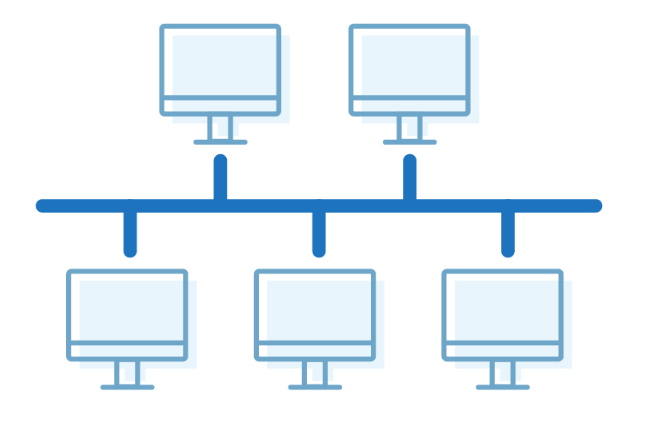
The bus topology is designed in such a way that all the stations are connected through a Each node is either connected to the single cable known as a backbone cable.
-
Backbone cable by drop cable or directly connected to the backbone cable.
-
When a node wants to send a message over the network, it puts a message over the network.
-
All the stations available in the network will receive the message whether it has been addressed or not.
-
The bus topology is mainly used in 802.3 (Ethernet) and 802.4 standard networks.
-
The configuration of a bus topology is quite simpler as compared to other topologies.
-
The backbone cable is considered as a "single lane" through which the message is broadcast to all the stations.
-
Advantages:
- Low-cost cable: In bus topology, nodes are directly connected to the cable without passing through a hub. Therefore, the initial cost of installation is low.
- Moderate data speeds: Coaxial or twisted pair cables are mainly used in bus-based networks that support up to 10 Mbps.
- Familiar technology: Bus topology is a familiar technology as the installation and troubleshooting techniques are well known, and hardware components are easily available.
- Limited failure: A failure in one node will not have any effect on other nodes
-
Disadvantages:
- Extensive cabling: A bus topology is quite simpler, but still it requires a lot of cabling.
- Difficult troubleshooting: It requires specialized test equipment to determine the cable faults. If any fault occurs in the cable, then it would disrupt the communication for all the nodes.
- Signal interference: If two nodes send the messages simultaneously, then the signals of both the nodes collide with each other.
- Reconfiguration difficult: Adding new devices to the network would slow down the network.
- Attenuation: Attenuation is a loss of signal leads to communication issues. Repeaters are used to regenerate the signal.
Ring Topology
-
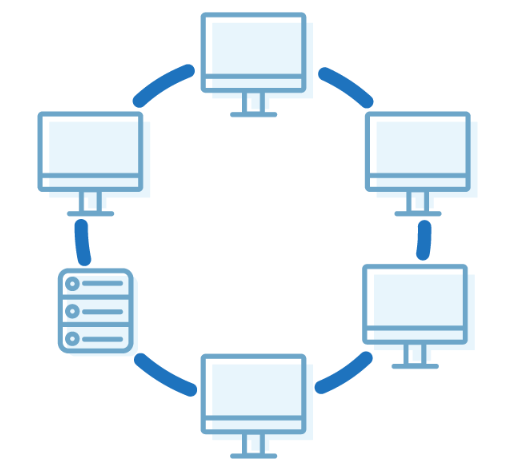
In this topology, it forms a ring connecting devices with its exactly two neighbouring devices.
-
A number of repeaters are used for Ring topology with a large number of nodes, because if someone wants to send some data to the last node in the ring topology with 100 nodes, then the data will have to pass through 99 nodes to reach the 100th node. Hence to prevent data loss repeaters are used in the network
-
The transmission is unidirectional, but it can be made bidirectional by having 2 connections between each Network Node, it is called Dual Ring Topology
-
Advantages:
- Network Management: Faulty devices can be removed from the network without bringing the network down.
- Product availability: Many hardware and software tools for network operation and monitoring are available.
- Cost: Twisted pair cabling is inexpensive and easily available. Therefore, the installation cost is very low.
- Reliable: It is a more reliable network because the communication system is not dependent on the single host computer.
-
Disadvantages:
- Difficult troubleshooting: It requires specialized test equipment to determine the cable faults. If any fault occurs in the cable, then it would disrupt the communication for all the nodes.
- Failure: The breakdown in one station leads to the failure of the overall network.
- Reconfiguration difficult: Adding new devices to the network would slow down the network.
- Delay: Communication delay is directly proportional to the number of nodes. Adding new devices increases the communication delay
Star Topology
-
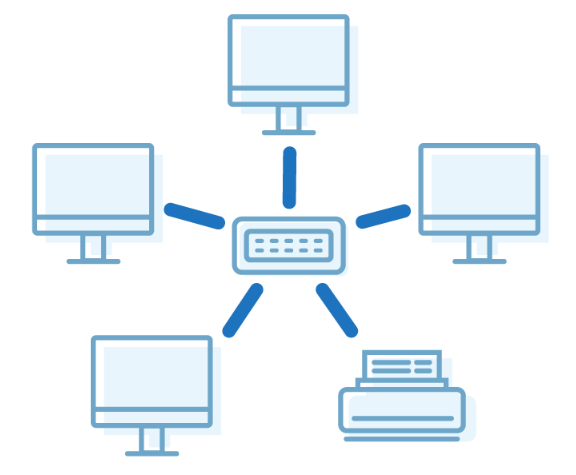
In star topology, all the devices are connected to a single hub through a cable. This hub is the central node and all other nodes are connected to the central node. The hub can be passive in nature i.e., not an intelligent hub such as broadcasting devices, at the same time the hub can be intelligent known as an active hub. Active hubs have repeaters in them.
-
A star topology having four systems connected to a single point of connection i.e. hub.
-
Advantages:
- Network control: Complex network control features can be easily implemented in the star topology. Any changes made in the star topology are automatically accommodated
- Limited failure: As each station is connected to the central hub with its own cable, therefore failure in one cable will not affect the entire network.
- Familiar technology: Star topology is a familiar technology as its tools are cost-effective.
- Easily expandable: It is easily expandable as new stations can be added to the open ports on the hub.
- Cost effective: Star topology networks are cost-effective as it uses inexpensive coaxial cable.
- High data speeds: It supports a bandwidth of approx. 100Mbps. Ethernet 100BaseT is one of the most popular Star topology networks.
-
Disadvantages:
- A Central point of failure: If the central hub or switch goes down, then all the connected nodes will not be able to communicate with each other.
- Cable: Sometimes cable routing becomes difficult when a significant amount of routing is required.
Tree Topology
-
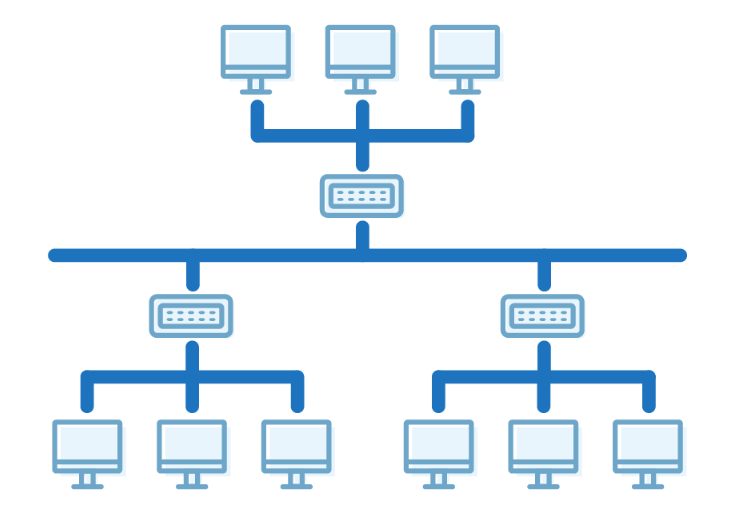
A tree topology is a type of structure in which all the computers are connected with each other in hierarchical fashion.
-
Tree topology combines the characteristics of bus topology and star topology.
-
The top-most node in tree topology is known as a root node, and all other nodes are the descendants of the root node.
-
There is only one path exists between two nodes for the data transmission. Thus, it forms a parent-child hierarchy.
-
Advantages:
- Support for broadband transmission: Tree topology is mainly used to provide broadband transmission, i.e., signals are sent over long distances without being attenuated.
- Easily expandable: We can add the new device to the existing network. Therefore, we can say that tree topology is easily expandable.
- Easily manageable: In tree topology, the whole network is divided into segments known as star networks which can be easily managed and maintained.
- Error detection: Error detection and error correction are very easy in a tree topology.
- Limited failure: The breakdown in one station does not affect the entire network.
- Point-to-point wiring: It has point-to-point wiring for individual segments.
-
Disadvantages:
- Difficult troubleshooting: If any fault occurs in the node, then it becomes difficult to troubleshoot the problem.
- High cost: Devices required for broadband transmission are very costly.
- Failure: A tree topology mainly relies on main bus cable and failure in main bus cable will damage the overall network.
- Reconfiguration difficult: If new devices are added, then it becomes difficult to reconfigure.
Mesh Topology
-
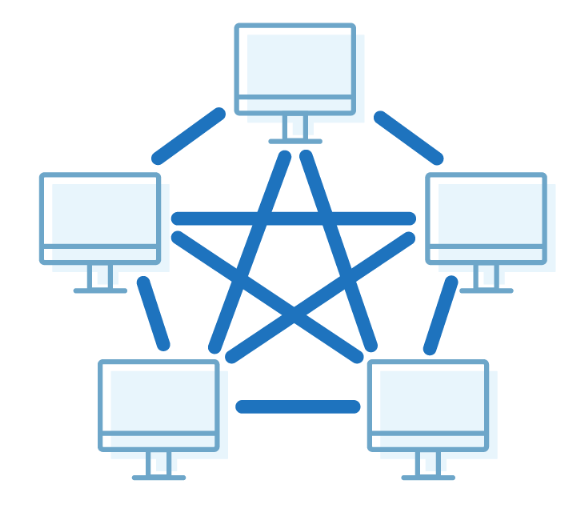
There are multiple paths from one computer to another computer.
-
It does not contain the switch, hub or any central computer which acts as a central point of communication.
-
The Internet is an example of the mesh topology.
-
Mesh topology is mainly used for WAN implementations where communication failures are a critical concern.
-
Mesh topology is mainly used for wireless networks.
-
Mesh topology can be formed by using the formula:
-
Number of cables =
(n*(n-1))/2 -
Advantages:
- Reliable: The mesh topology networks are very reliable as if any link breakdown will not affect the communication between connected computers.
- Fast Communication: Communication is very fast between the nodes.
- Easier Reconfiguration: Adding new devices would not disrupt the communication between other devices.
-
Disadvantages:
- Cost: A mesh topology contains a large number of connected devices such as a router and more transmission media than other topologies.
- Management: Mesh topology networks are very large and very difficult to maintain and manage. If the network is not monitored carefully, then the communication link failure goes undetected.
- Efficiency: In this topology, redundant connections are high that reduces the efficiency of the network.
Hybrid Topology
-
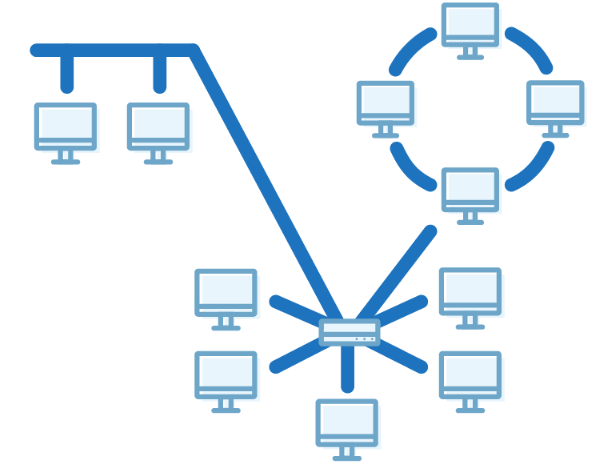
The combination of various different topologies is known as Hybrid topology.
-
A Hybrid topology is a connection between different links and nodes to transfer the data.
-
When two or more different topologies are combined together is termed as Hybrid topology and if similar topologies are connected with each other will not result in Hybrid topology.
-
For example, if there exist a ring topology in one branch of ICICI bank and bus topology in another branch of ICICI bank, connecting these two topologies will result in Hybrid topology.
-
Advantages:
- Reliable: If a fault occurs in any part of the network will not affect the functioning of the rest of the network.
- Scalable: Size of the network can be easily expanded by adding new devices without • affecting the functionality of the existing network.
- Flexible: This topology is very flexible as it can be designed according to the requirements of the organization.
- Effective: Hybrid topology is very effective as it can be designed in such a way that the strength of the network is maximized and weakness of the network is minimized.
-
Disadvantages:
- Complex design: The major drawback of the Hybrid topology is the design of the Hybrid network. It is very difficult to design the architecture of the Hybrid network.
- Costly Hub: The Hubs used in the Hybrid topology are very expensive as these hubs are different from usual Hubs used in other topologies.
- Costly infrastructure: The infrastructure cost is very high as a hybrid network requires a lot of cabling, network devices, etc.
Network Devices
-
Network devices are physical devices that allow hardware on a computer network to communicate and interact with each other.
-
Network devices like hubs, repeaters, bridges, switches, routers, gateways, and router help manage and direct data flow in a network.
-
They ensure efficient communication between connected devices by controlling data transfer, boosting signals, and linking different networks.
-
Each device serves a specific role, from simple data forwarding to complex routing between networks.
-
Network devices work as a mediator between two devices for transmission of data, and thus play a very important role in the functioning of a computer network.
-
Functions of Network Devices
- Network devices help to send and receive data between different devices.
- Network devices allow devices to connect to the network efficiently and securely.
- Network devices improves network speed and manage data flow better.
- It protects the network by controlling access and preventing threats.
- Expand the network range and solve signal problems.
-
Common Types of Networking Devices:
- Repeater, Hub, Bridge, Switch, Routers, Gateway, NIC, Modem
Repeater
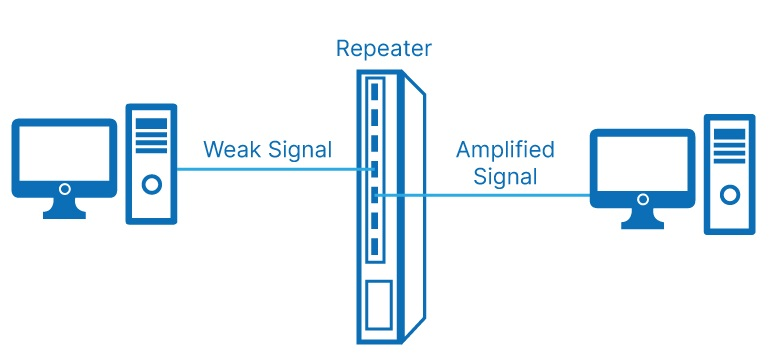
- Description: A repeater is an electronic device that receives a network signal and retransmits it at a higher power level or to the other side of an obstruction, so the signal can cover longer distances.
- Function: It cleans and strengthens weak or corrupted signals.
- Usage: Used in long-distance communication or in extending LANs.
- OSI Layer: Physical Layer (Layer 1)
- Limitation: Cannot filter or manage data traffic.
Hub
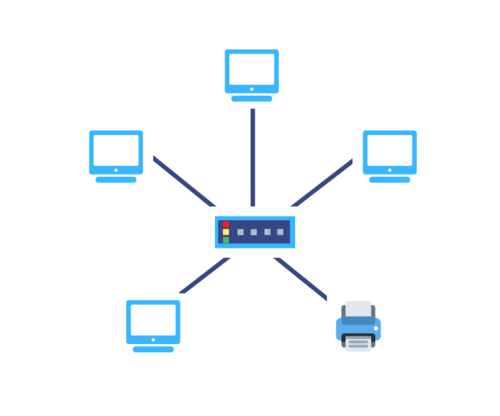
- Description: A hub is a basic networking device that connects multiple computers in a network. It does not manage traffic and simply sends the data it receives to all connected devices.
- Function: Acts as a common connection point in a LAN.
- OSI Layer: Physical Layer (Layer 1)
- Limitation: Causes unnecessary traffic and collisions; not secure or efficient.
Switch
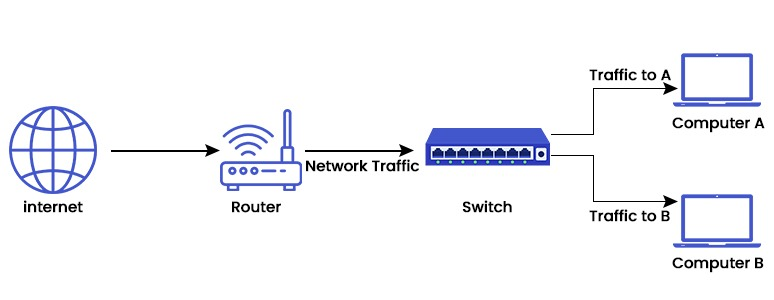
- Description: A switch is a smarter device than a hub. It identifies the MAC address of devices connected to it and sends data only to the correct destination.
- Function: Improves network efficiency by reducing collisions.
- OSI Layer: Data Link Layer (Layer 2)
- Advantage: Offers faster data transfer and better performance in LANs.
Router
- Description: A router is used to connect different networks together and routes data between them using IP addresses
- Function: Connects LAN to the internet and determines the best path for data.
- OSI Layer: Network Layer (Layer 3)
- Smart Features: Supports security, DHCP, NAT, and wireless routing.
Bridge
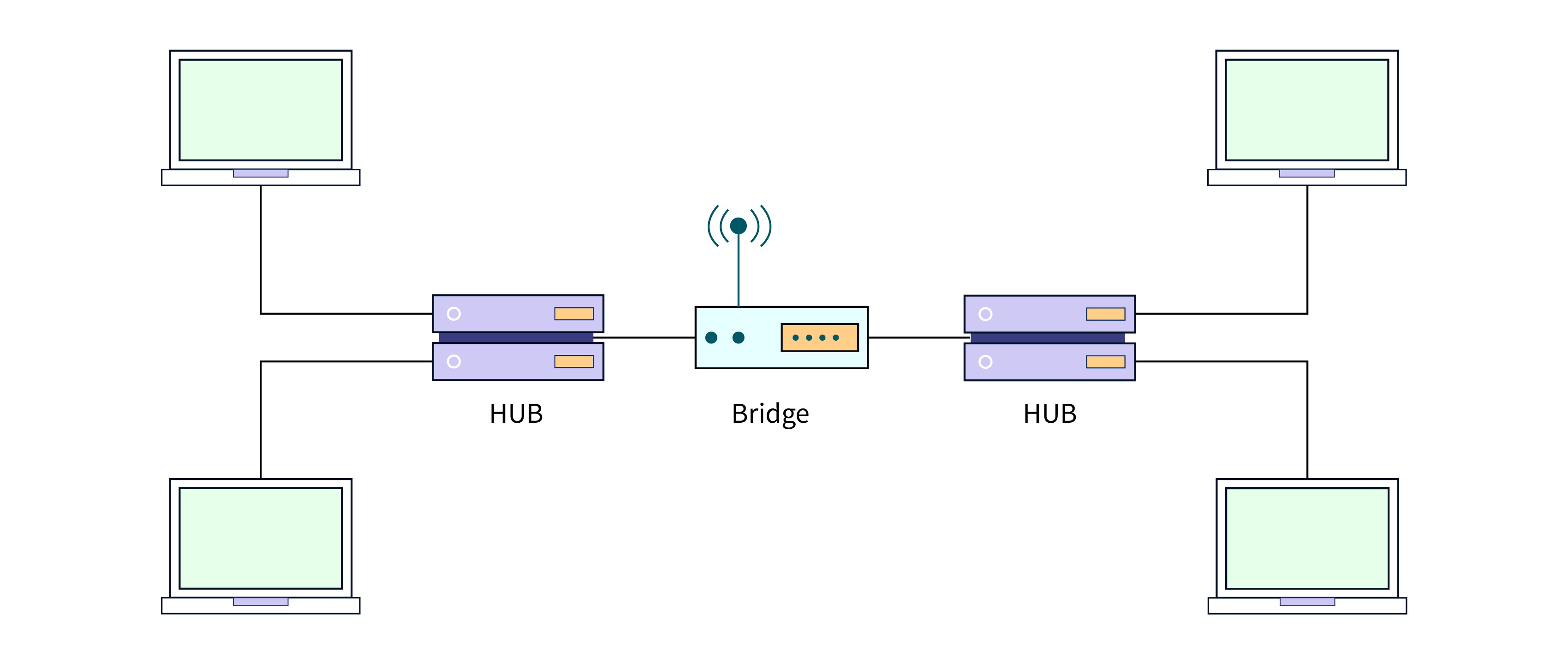
- Description: A bridge connects two or more separate LANs (of the same type) to form a single network.
- Function: Filters traffic using MAC addresses and reduces traffic by dividing collision domains.
- OSI Layer: Data Link Layer (Layer 2)
- Usage: Useful in managing traffic in large LANs.
Gateway
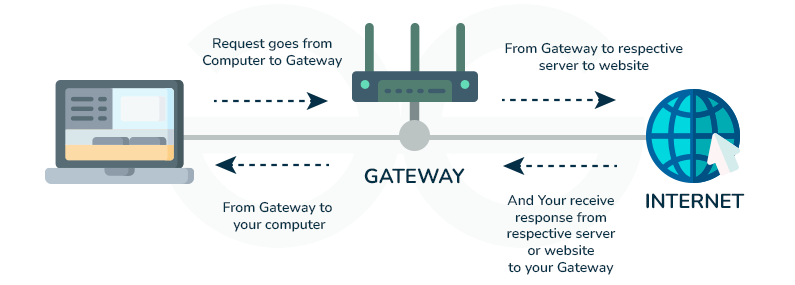
- Description: A gateway connects networks that use different protocols. It translates communication between different architectures or data formats.
- Function: Protocol converter; often used to connect enterprise networks to the internet.
- OSI Layer: Application Layer (Layer 7) and sometimes all layers.
- Example: Connecting a private company network with cloud services.
Modem (Modulator/Demodulator)
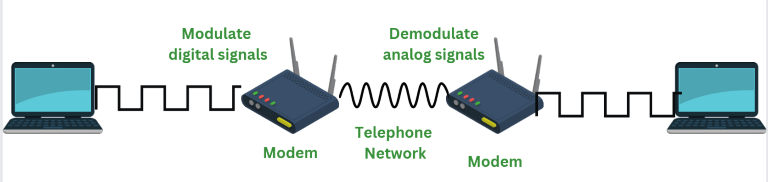
- Description: A modem converts digital data from a computer to analog signals for transmission over telephone lines and vice versa.
- Function: Enables internet access through telephone lines.
- OSI Layer: Physical and Data Link Layer
- Example: DSL or cable modem at home.
Network Interface Card
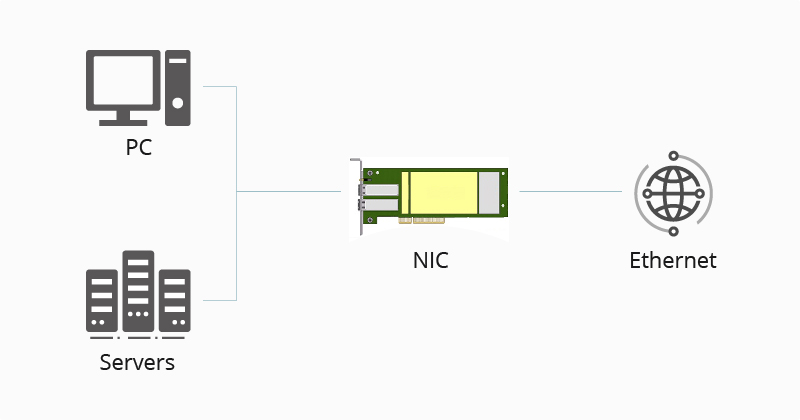
- Network interface card is a network adapter that is used to connect the computer to the network. It is installed in the computer to establish a LAN.
- It has a unique ID that is written on the chip, and it has a connector to connect the cable to it.
- The cable acts as an interface between the computer and the router or modem.
- NIC is a layer 2 device which means that it works on both the physical and data link layers of the network model.
Transmission Media Types
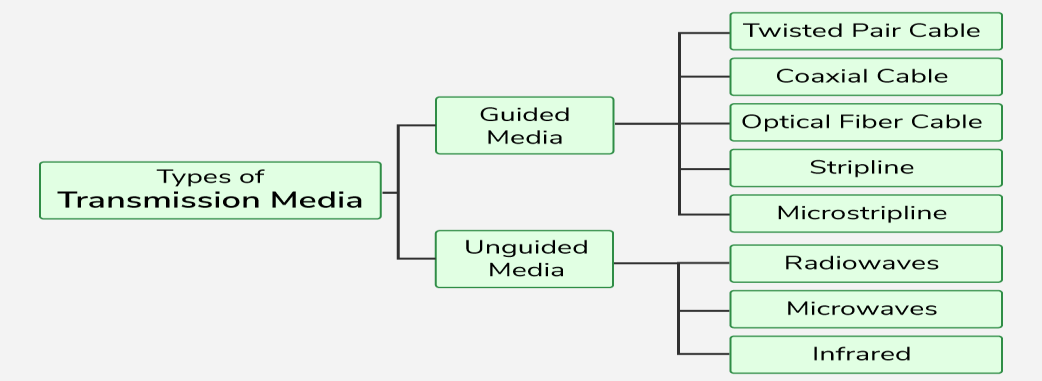
- Transmission media is the physical medium through which data is transmitted from one device to another within a network. These media can be wired or wireless.
Guided Media
- We know that media is one of the responsibilities of the physical layer. Generally, the media is controlled by the physical layer and is used for the actual transmission of bits from the sender’s physical layer to the receiver’s physical layer.
- There are two types of media, guided media, and unguided media. We will discuss Guided Media in this tutorial.
- Guided media is a way of physically connecting devices to a network.
- Guided media is used when devices need to be connected to a network using cables. For example, connecting end devices to switches using cables is known as guided or wired networks.
- Guided media is also called wired media.
- Guided media uses cables between devices to transmit bits.
- Each device has a NIC (Network Interface Card), which connects to an intermediary device port using a cable on the network.
- Guided media uses Ethernet NIC to connect to the network while unguided media uses a wireless
Types of Guided Media
- Twisted Pair Cable:
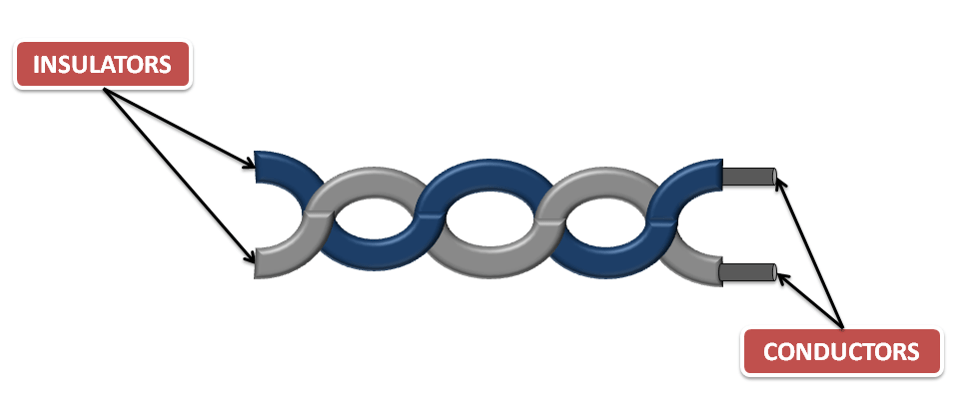
- It is also known as copper cabling and is one of the most commonly used cablings in networks. Two insulated copper cables are twisted together in a helical form to prevent crosstalk and physical damage.
- It is commonly used in today’s networks to transmit bits from the sender’s physical layer to the receiver’s physical layer. It is made up of two insulated copper cables that are twisted together in a helical form to prevent crosstalk and physical damage.
- The purpose of twisting cables is to reduce crosstalk. When two cables are twisted, each one produces opposite waves that cancel out each other, which reduces the noise on a channel.
- In twisted pair cable, one copper cable is used to send the signal to the receiver and the other is used for earthing (grounding) purposes.
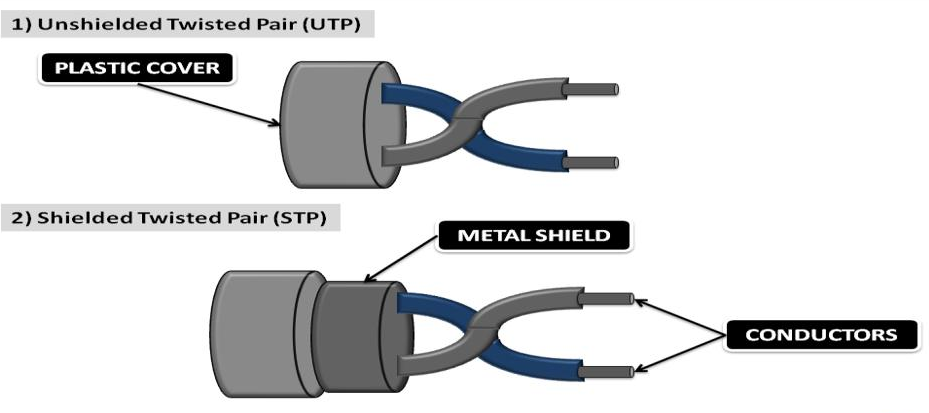
- Unshielded Twisted Pair Cable: UTP cables are commonly used to connect hosts to intermediary devices on a network using an RJ-45 connector. UTP cables consist of four different colored pairs of wires (orange, green, blue, and brown) that are shielded by a plastic sheath to prevent loss or damage to the signal.
- Straight through cable and crossover cable are the types of UTP cables.
- Straight-through cables are used to connect different types of devices on a network. For example, to connect end devices to switches or to connect switches to routers.
- Crossover cables are used to connect similar types of devices on a network. For example, to connect end device to end device or to connect router to router.
- Shielded Twisted Pair Cable: STP is more expensive than UTP and difficult to set up. The pair of the insulated conductor is shielded by metal.
- STP prevents crosstalk better than UTP. Both STP and UTP use RJ-45 connectors to connect devices.
- STP cable has 4 types of colored cables that are twisted together and wrapped with a braided shield, the braided shield is also protected by foil or metal to prevent physical damage.
- Coaxial Cable:
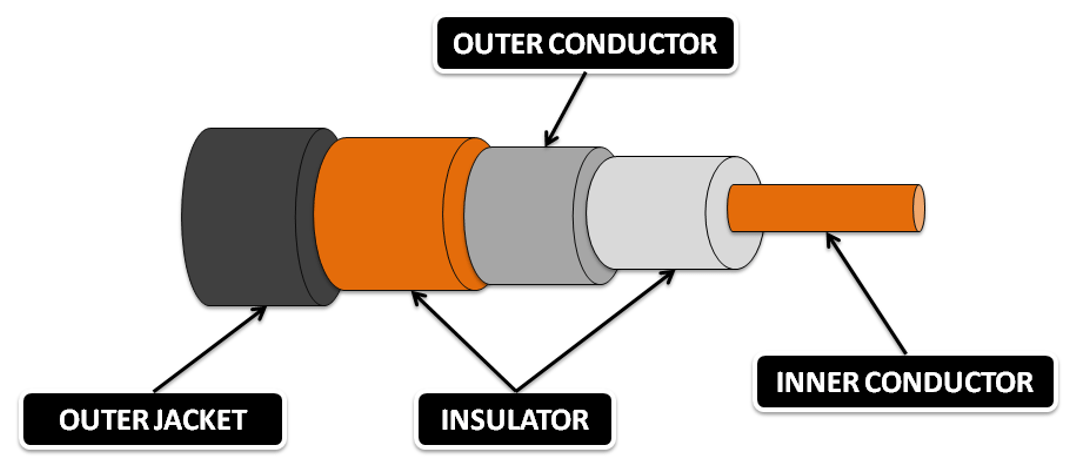
- Coaxial cable has two conductors on the same axis that shield the cable.
- A copper cable surrounded by a copper conductor transmits electronic signals.
- The copper conductor is also shielded by an insulating material that acts as a second wire. And the whole cable is protected by the jacket.
- Coaxial cable has two conductors, the inner conductor and the outer conductor.
- The inner conductor of the coaxial cable transmits electronic signals, and the outer conductor is used to prevent noise on the channel.
- Bayonet Neill Concelman (BNC), N-type, and F-type are the types of connectors used in coaxial cable.
- BNC is the most commonly used connector of coaxial cable in Ethernet networks and cable TV.
- Fibre Optics Cable:
- Fiber optic cables are made of glass and transmit bits in the form of light over the communication channel.
- Fiber optic cable is much more expensive than a twisted pair cable and a coaxial cable.
- Signals in fiber optic cable can travel very long distances because it provides high bandwidth.
- The signal loss in fiber optic cable is negligible. The fiber-optic cable transmits signals with very little attenuation.
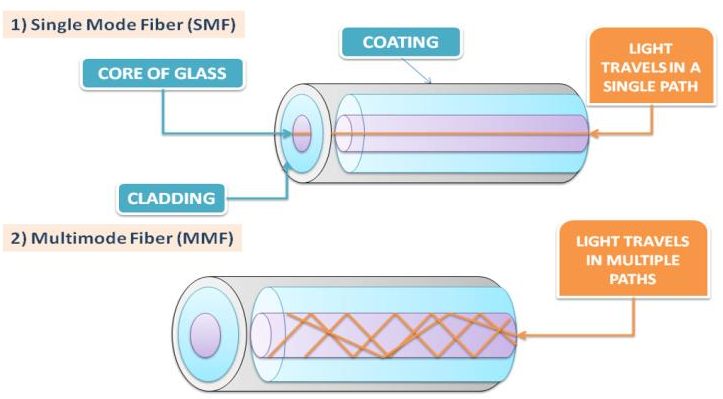
- Single-mode fiber: It is very expensive and is used when the signal has to travel a very long distance. It sends the signal in light format. SMF is used in cable TV connections.
- Multi-mode fiber: The core of the MMF is larger than that of the SMF and transmits the signal in the form of a light pulse. It is used in LAN networks that have a range of about 500 meters
- SC (Subscriber Connector), ST (Straight Tip), Lucent Connector (LC), and Duplex Multimode LC (DMLC) are types of fiber optic connectors.
Difference: Twisted Pair, Coaxial & Fiber Optics Cable
| Parameter | Twisted Pair | Coaxial | Fiber Optics |
|---|---|---|---|
| Definition | Two insulated copper cables are twisted together in a helical form to prevent crosstalk and physical damage. | Coaxial cable has two conductors, the inner conductor and the outer conductor. Both conductors are shielded by insulators, and the whole cable is shielded by a jacket. | Fiber optic cables are made of glass that is very thin like human hair and transmits signals in the form of light over very long distances. |
| Bandwidth | Low | High | Very High |
| Cost | Cheap | Moderate | Expensive |
| Loss of Data | High | Moderate | Negligiable |
| Connectors | RJ-45 | BNC, N-Type, F-Type | SC, ST, LC, DMLC |
| Range | 100m | 200m-2Km | 100Km |
| Speed | 10 Mb/s - 100Gb/s | 10 Mb/s - 100Mb/s | 10 Mb/s - 200Gb/s |
| Uses | Connects end devices to Intermediary devices | Radio Frequency signals, Voice communication | Local Area Network, Long distance transmission |
Unguided Media
- The medium which transmits signals in the form of electromagnetic waves without using any physical conductor is known as unguided media.
- Unguided media is the second type of transmission media after guided media. It is used to connect devices to the network without using cables
- When unguided media is used to connect the end device to the network, the end device’s wireless NIC is used. Because, wired NIC is used in wired or guided media and wireless NIC is used in wireless or unguided media.
- Unguided media transmits signals that represent bits of data. Typically, unguided media represent bits of data using radio waves, microwaves, or infrared waves.
- IEEE and the telecommunications industry specify standards for wireless communications such as Wi- Fi, Bluetooth, and Wi-Max.
Types of Unguided Media
- Radio Waves Transmission:
- Unguided media transmit bits as electromagnetic waves having a range of 3 kHz to 1 GHz frequency, known as radio waves
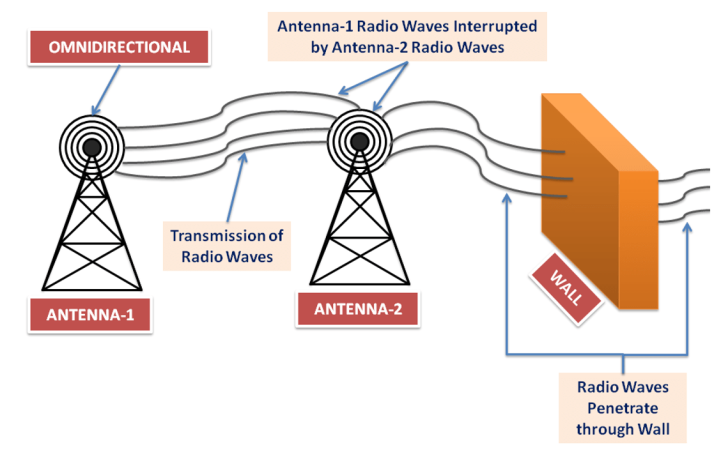
- Radio waves are omnidirectional in nature, so when radio waves are transmitted through an antenna, they propagate in all directions.
- In simple words, sender and receiver antennas do not have to be aligned
- The main problem with radio waves here is that radio waves transmit signals in all directions, which can be interrupted by another antenna that uses the same frequency.
- Radio waves can travel long distances, so it is used in broadcasting. It can also penetrate through a wall because of its low frequency.
- The frequency of radio waves varies according to the wavelength, power, and purpose of transmission
- Microwave Transmission:
- Unguided media transmit bits as electromagnetic waves having a frequency range of 1 GHz to 300 GHz, known as microwaves.
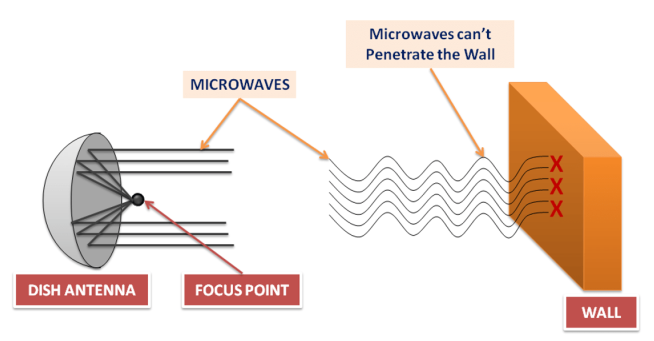
- Microwaves are unidirectional, which means that when antennas transmit signals, they transmit along a narrow-focused path.
- Due to the narrow path, the sender and receiver antenna have to be aligned.
- Microwaves are unidirectional, so the signal is transmitted without interfering with other antennas signals.
- When microwaves are of higher frequencies, they cannot penetrate walls like radio waves.
- For example, the sender sends a high-frequency microwave signal to the receiver, but the receiver is indoors, the signal will not be able to penetrate the wall, causing signal loss
- Infrared Waves Transmission:
- Unguided media transmit bits as electromagnetic waves having a frequency range of 300 GHz to 400 THz, known as infrared waves. Generally, infrared waves are used for short-distance communication.
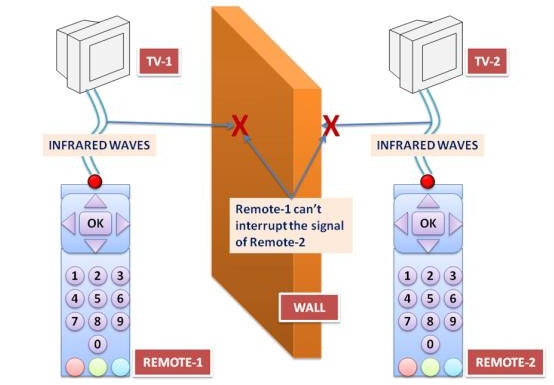
- Infrared waves block interference with other system waves.
- For example, when a user is communicating using infrared waves in a room, such as controlling a TV with a remote, it does not affect neighboring TVs.
- Infrared waves are not used for long-distance communication.
- Also, we cannot use infrared waves in the sun’s rays outside because the sun’s rays also contain infrared waves, which can interfere with other infrared waves and result in data loss.
- Infrared waves have very high bandwidth, such as 400 terahertz. Therefore infrared waves can transmit signals at a very high data rate.
- The Infrared Data Association (IRDA) has defined a data rate of 75 kbps, which can cover a distance of up to 8 meters. They have also defined another data rate which is 4 Mbps
Propagation in Unguided Media
- When a signal travels from sender to receiver, it can travel in different ways as follows
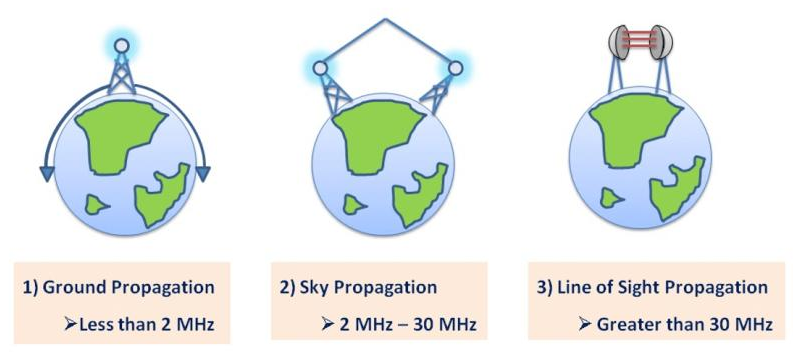
- Ground Propagation:
- It follows the curvature of the Earth, which means that radio waves travel very closely through the lowest part of the Earth’s atmosphere. It can measure the distance according to the signal strength.
- The higher the signal strength, the greater the distance the signal can travel.
- Ground Propagation is used in long-range radio navigation.
- Sky Propagation:
- In this propagation, the waves traveling upward into the ionosphere are reflected.
- The ionosphere is one of the layers of the atmosphere that consists of particles in the form of ions.
- In this transmission, the signals can travel long distances with minimum output power.
- Sky propagation is used in AM and FM radio, Very High-Frequency Television, and Citizen Band, etc.
- Line of sight Propagation:
- Signals of very high frequencies are transmitted from antenna to antenna in a straight line.
- Here the antennas used for transmission are facing each other and are directional.
- Line of sight propagation is used in cellular phones, satellite signals, and radars, etc.
Limitation of Unguided Media
- Unguided media limits effective coverage due to the materials used in buildings and local area networks.
- For example, if you are using microwaves for communication, then they cannot penetrate through the wall.
- Radio waves are interrupted by radio waves from other antennas because they are omnidirectional, increasing the likelihood of one radio wave colliding with other radio waves.
- Microwaves are unidirectional, but they cannot penetrate through a wall, which can cause an error in the signal.
- Wireless or unguided media do not have a physical shield, like guided media.
- Therefore, unauthorized access and loss of data increased, and the network administrator has to check media and network regularly.
- Wireless LAN uses a half-duplex mode for communication which means that one device can send or receive at a time, and wireless media is shared with all communication devices, which reduces the bandwidth of the network.
- This is because multiple users try to access the WLAN simultaneously
Difference: Radio, Micro, Infrared Waves
| Parameter | Radio Wave | Micro Wave | Infrared Wave |
|---|---|---|---|
| Definition | Unguided media transmit bits as electromagnetic waves having a range of 3 kHz to 1 GHz, known as microwaves | Unguided media transmit bits as electromagnetic waves having a range of 1 GHz to 300 GHz, known as microwaves. | Unguided media transmit bits as electromagnetic waves having a range of 300 GHz to 400 THz, known as microwaves. |
| Frequency | 3 kHz to 1 GHz | 1 GHz to 300 GHz | 300 GHz to 400 THz |
| Nature | Omnidirectional | Unidirectional | Short-range waves |
| Data Loss | Moderate | Low | Very Low |
| Advantage | Penetrate through the wall | One microwave does not interfere with another microwave | One infrared wave does not interfere with another infrared wave |
| Use | Used for long-distance transmission such as broadcasting | Used for unicast communication, such as military and radar | Used for short-distance communication such as controlling a TV with a remote |