DBMS01-Introduction
On This Page
DATA
- Data is a raw and unorganized fact
- Required to be processed to make it meaningful
- Generally, data comprises facts, observations, perceptions numbers, characters, symbols, image, etc.
INFORMATION
- A set of data which is processed in a meaningful way according to the given requirement
- Information assigns meaning, improves the reliability of the data
- Helps in decision making
DATABASE
- Collection of inter-related data which is used to retrieve, insert and delete the data efficiently
- Used to organize the data in the form of a table, schema, views, and reports, etc.
- Basic Example: Dictionary, Airline Database, Student Database, Library etc
- For example: The college Database organizes the data about the admin, staff, students and faculty etc.
DBMS
- A software system for creating, organizing and managing the database
- It provide an environment to the user to perform operation on the database for creation, insertion, deletion, updating and retrieval of data
- A DBMS provides an interface between the user/application and the database
- Example: MySQL, Oracle, PostgreSQL, Microsoft SQL Server, and SQLite
APPLIACTIONS OF DBMS
- Banking: Stores customer accounts, transactions, loans, and ATM records. Ensures secure and accurate financial data management.
- Hospital Management: Maintains patient records, doctor details, appointments, and billing. Helps improve healthcare services and data accessibility.
- Education: Manages student information, attendance, exams, grades, and fees. Used by schools, colleges, and universities.
- Railway and Airline Reservation: Handles ticket booking, cancellations, schedules, and passenger details. Supports real-time seat availability.
- E-commerce: Stores product details, customer information, orders, and payment records. Enables efficient online shopping and inventory management.
- Library Management: Keeps records of books, members, borrowing, and returns. Reduces manual work and improves tracking.
- Telecommunication: Manages customer data, call records, billing, and recharge information. Supports millions of users efficiently.
- Retail and Inventory Management: Tracks products, stock levels, sales, and supplier information. Helps prevent overstocking or stock shortages.
- Human Resource Management (HRM): Stores employee details, payroll, attendance, and performance records. Simplifies workforce management.
- Government Organizations: Maintains records such as voter IDs, passports, tax information, and census data. Improves public service efficiency and data security.
DIFFERENCE: FILE SYSTEM & DBMS
| Basis | File System | DBMS |
|---|---|---|
| Procedure | User has to write procedures for managing data. | User is not required to write procedures. |
| Data Representation | Provides details of data representation and storage. | Provides an abstract view of data and hides the details. |
| Crash Recovery | Does not have a crash recovery mechanism. | Provides a crash recovery mechanism. |
| Data Protection | It is difficult to protect files. | Provides a good protection mechanism. |
| Storage & Retrieval | Cannot efficiently store and retrieve data. | Efficiently stores and retrieves data using sophisticated techniques. |
| Concurrent Access | Has problems with concurrent access. | Manages concurrent access using locking mechanisms. |
DATA INDEPENDENCE
- Data Independence is a fundamental concept in DBMS
- It refers to the ability to modify the schema at one level of the database without affecting the schema at the next higher level.
- This concept ensures that changes in how data is stored or structured internally do not impact how users or applications access and interact with the data
PHYSICAL & LOGICAL DI
| Basis | Physical Data Independence | Logical Data Independence |
|---|---|---|
| Focus | Focuses on how data is stored physically. | Focuses on the structure and organization of data. |
| Schema | Deals with the internal schema. | Deals with the conceptual schema. |
| Effect on Programs | Changes do not affect application programs. | Changes may require updates in application programs. |
| Difficulty | Easier to achieve. | More difficult to achieve. |
| Purpose | Used for performance and storage optimization. | Used for evolving database design. |
| Example | Example: Moving data files or adding indexes. | Example: Adding or removing a column in a table. |
ARCHITECTURE IN DBMS
- The architecture defines how the database and its components interact with the end users or applications.
- These architectures determine how the data, user interface, and business logic are separated and interact with each other.
1-TIER ARCHITECTURE
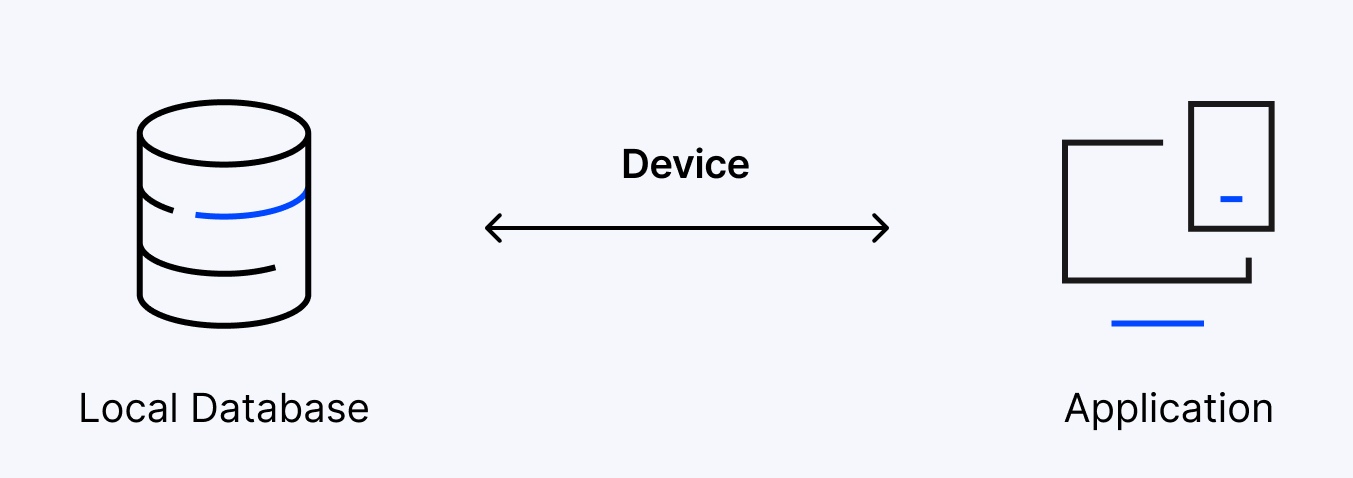
- The user works directly with the database on the same system
- The client, server and database are all in one application
- The user can open the application, interact with the data and perform tasks without needing a separate server or network connection.
- This setup is simple and easy to use
- Ideal for personal or standalone applications where no external server or network connection is needed
- It does not require a network or complex setup, which is why it's often used in small-scale or individual use cases
- Everything from the user interface to the logic and data storage happens on the same device.
- The user enters data, performs calculations and Saves files directly on their computer.
- For example Microsoft Excel.
- Advantages:
- Simple Architecture: the most simple architecture to set up
- Cost-Effective: No additional hardware is required
- Easy to Implement: the most simple architecture to set up, as only a single machine is required, hence it is mostly used in small projects
- Disadvantages:
- Limited to Single User: Only one person can use the application at a time, not designed for multiple users or teamwork
- Poor Security: Since everything is on the same machine, if someone gets access to the system, they can access both the data and the application easily
- No Centralized Control: Data is stored locally, so there's no central database, makes it hard to manage or back up data across multiple devices
- Hard to Share Data: Sharing data between users is difficult because everything is stored on one computer
2-TIER ARCHITECTURE
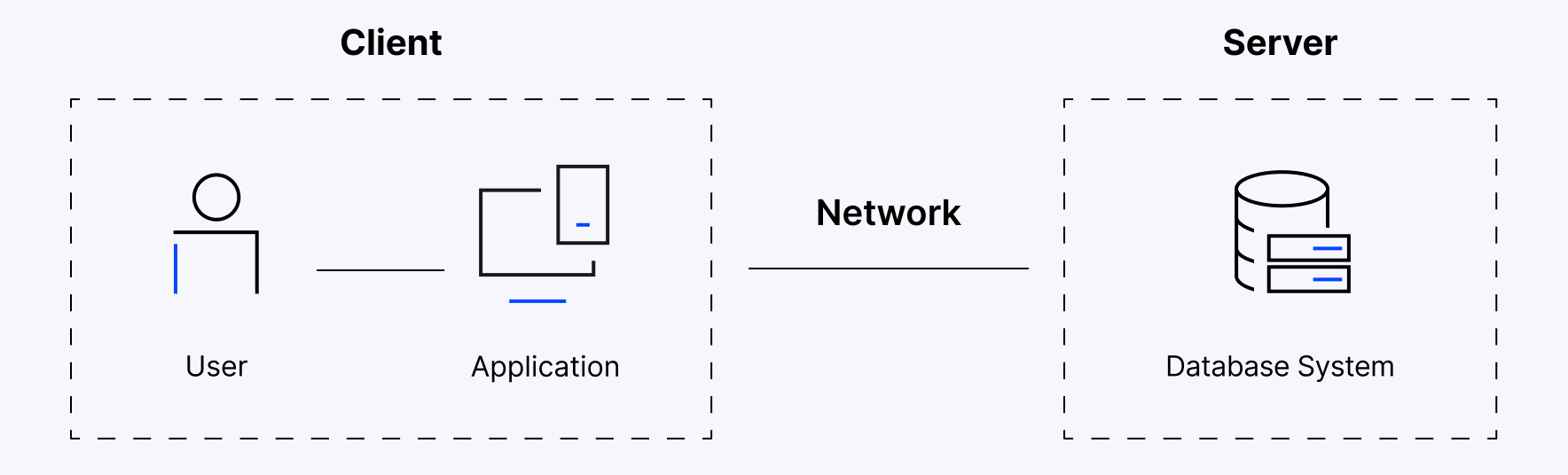
- Similar to a basic client-server model.
- The application at the client end directly communicates with the database on the server side.
- APIs like ODBC (Open Database Connectivity) and JDBC (Java Database Connectivity) are used for this interaction.
- The server side is responsible for providing query processing and transaction management functionalities.
- On the client side, the user interfaces and application programs are run.
- The application on the client side establishes a connection with the server side to communicate with the DBMS.
- For Example: A Library Management System used in schools or small organizations
- Client Layer (Tier 1): This is the user interface that library staff or users interact with.
- Database Layer (Tier 2): The database server stores all the library records such as book details, user information and transaction logs.
- The client layer sends a request (like searching for a book) to the database layer which processes it and sends back the result. This separation allows the client to focus on the user
- Advantages:
- Easy to Access: easy access to the database, which makes fast retrieval
- Scalable: We can scale the database easily, by adding clients or upgrading hardware.
- Low Cost: cheaper than 3-Tier Architecture and Multi-Tier Architecture.
- Easy Deployment: easier to deploy than 3-Tier Architecture.
- Simple: easily understandable as well as simple because of only two components.
- Disadvantages:
- Limited Scalability: As the number of users increases, the system performance can slow down because the server gets overloaded with too many requests.
- Security Issues: Clients connect directly to the database, which can make the system more vulnerable to attacks or data leaks.
- Tight Coupling: The client and the server are closely linked. If the database changes, the client application often needs to be updated too.
- Difficult Maintenance: Managing updates, fixing bugs, or adding features becomes harder when the number of users or systems increases.
3-TIER ARCHITECTURE
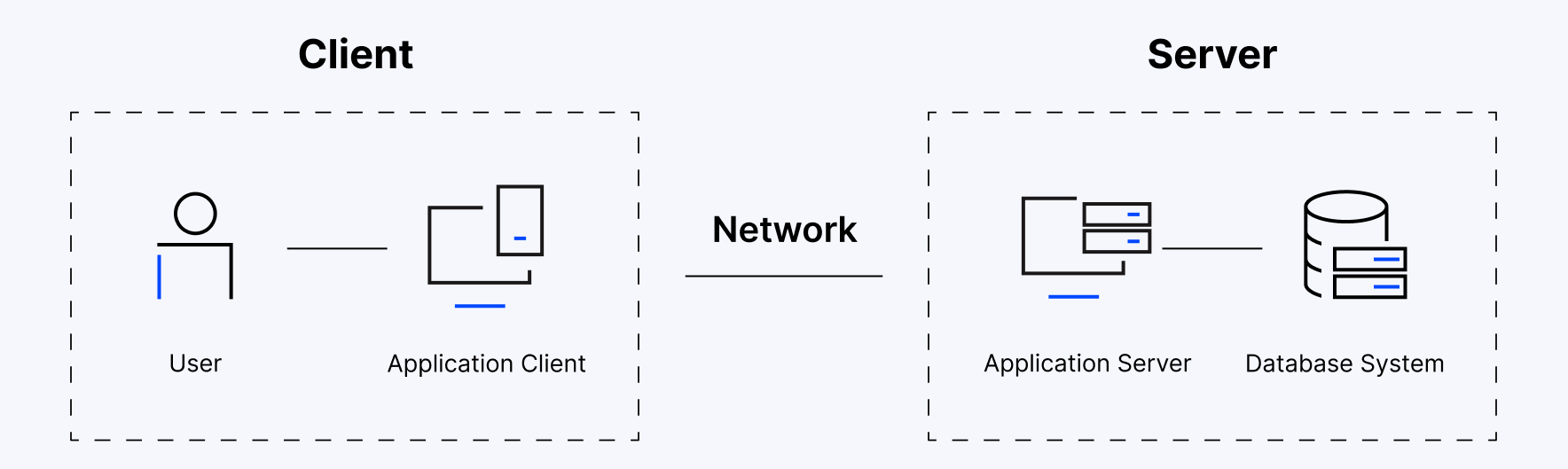
- The client does not directly communicate with the server
- Instead, it interacts with an application server which further communicates with the database system and then the query processing and transaction management takes place
- This intermediate layer acts as a medium for the exchange of partially processed data between the server and the client
- This type of architecture is used in the case of large web applications
- For example: E-commerce Store
- User: You visit an online store, search for a product and add it to your cart.
- Processing: The system checks if the product is in stock, calculates the total price and applies any discounts.
- Database: The product details, your cart and order history are stored in the database for future reference.
- Advantages:
- Enhanced scalability: due to the distributed deployment of application servers.
- Data Integrity: Since there is a middle layer between the client and the server, data avoided/removed. corruption can be avoided
- Security: prevents direct interaction of the client with the server thereby reducing access to unauthorized data
- Disadvantages:
- More Complex: more complex in comparison to 2-Tier Architecture. Communication Points are also doubled in 3-Tier Architecture.
- Difficult to Interact: due to the presence of middle layers.
- Slower Response Time: Since the request passes through an extra layer it may take more time to get a response compared to 2-Tier systems.
- Higher Cost: Setting up and maintaining three separate layers (client, server and database) requires more hardware, software and skilled people. This makes it more expensive.
DATABASE SCHEMA
- A database schema is the skeleton structure that represents the logical view of the entire database
- It defines how the data is organized and how the relations among them are associated. It formulates all the constraints that are to be applied on the data.
- A database schema defines its entities and the relationship among them
- It contains a descriptive detail of the database, which can be depicted by means of schema diagrams
- Its the database designers who design the schema to help programmers understand the database and make it useful.
- Physical Database Schema:
- This schema pertains to the actual storage of data and its form of storage like files, indices, etc.
- It defines how the data will be stored in a secondary storage.
- Logical Database Schema:
- This schema defines all the logical constraints that need to be applied on the data stored.
- It defines tables, views, and integrity constraints
DATA ABSTRACTION
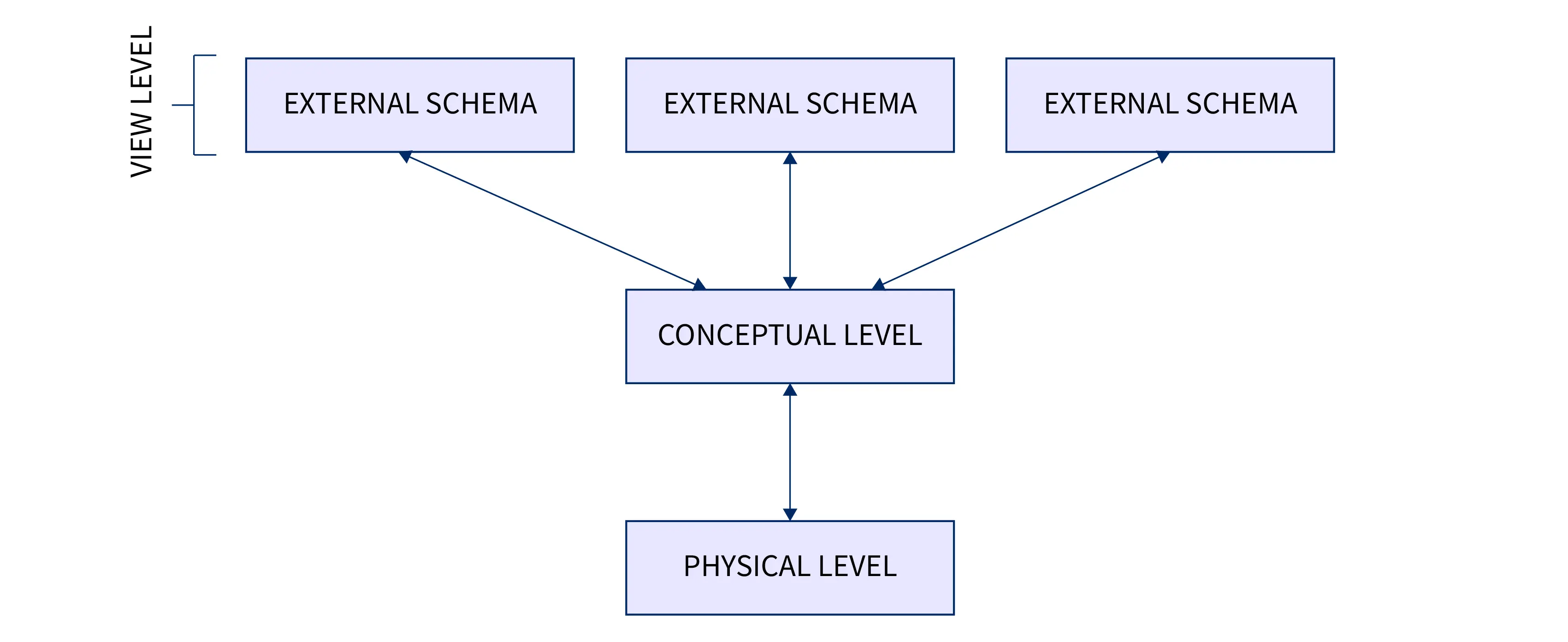
- Data abstraction hides unwanted details, showing users only relevant data.
- It keeps data safe by hiding how and where data is stored.
- Abstraction simplifies access while maintaining data security and efficiency.
- For example, while buying clothes, users see only color, size, and brand, not production details.
- There are three levels of data abstraction in DBMS
PHYSICAL (INTERNAL) LEVEL
- The lowest level of data abstraction which defines how data is stored in database
- It defines data structures used to store data and methods to access data in database
- It is very complex to understand and hence kept hidden from user
- Database administrator decides how and where to store the data in database.
- Deals with actual storage details like data organization, disk space allocation and data access methods.
LOGICAL (CONCEPTUAL) LEVEL
- It is intermediate level present next to physical level
- It defines what data is present in database and their relationships between them
- It is less complex as compared to physical level
- Programmers generally work at this level and depending on data, structure of tables, relationships and their constraints is decided at this level.
VIEW (EXTERNAL) LEVEL
- It is the highest level in abstraction
- There are different levels of views and each view defines only a part of whole data required to user
- This level defines many views of same database for simplification of view to user
- This is the highest level and easiest to understand for user.
COMPARISION
| Physical (Internal) Level | Logical (Conceptual) Level | View (External) Level |
|---|---|---|
| It is the lowest level of data abstraction. | It is the intermediate level of data abstraction. | It is the highest level of data abstraction. |
| Defines how data is physically stored in the database. | Defines what data is stored and the relationships between data. | Defines how users view the required part of the database. |
| Deals with data structures, storage, and access methods. | Deals with tables, relationships, and constraints. | Deals with different views of the same database. |
| Very complex and hidden from users. | Less complex than the physical level. | Easiest level for users to understand. |
| Database administrator decides how and where data is stored. | Programmers generally work at this level. | End users generally work at this level. |
| Example: Disk space allocation and data access methods. | Example: Defining tables and relationships. | Example: Showing only a student's marks and name to the student. |
CODD'S RULES
- The Information Rule: The information in a relational database must be stored in columns or rows of a table, i.e., a cell.
- The Guaranteed Access Rule: Every data value in a relational database must be accessible using the table name, primary key, and column name.
- Systematic Treatment of Null Values: Null values must be supported and treated systematically, regardless of the data type.
- Dynamic Online Catalog Based on the Relational Model: The database description or catalog must be stored in the same relational form as the data and accessible using the same query language.
- Comprehensive Data Sublanguage Rule: A relational database must support a language that can define data, manipulate data, define integrity constraints, and manage transactions.
- View Updating Rule: All theoretically updatable views must be updatable by the system.
- High-Level Insert, Update, and Delete: The database must support operations on sets of records, rather than requiring record-by-record processing.
- Physical Data Independence: Changes to the physical storage of data must not require changes to the applications using the database.
- Logical Data Independence: Changes to the logical structure of the database must not require changes to applications that do not depend on the changed structure.
- Integrity Independence: Integrity constraints must be definable in the database language and stored in the catalog, rather than being hard-coded into applications.
- Distribution Independence: Users should not need to know whether the database is distributed across multiple locations.
- Non-Subversion Rule: If the database provides a low-level way to access individual records, it must not be possible to use it to bypass the integrity and security rules of the relational system.
MAPPING
- Mapping in DBMS is the process of converting an Entity-Relationship (ER) model into a relational database structure consisting of tables, columns, primary keys, and foreign keys.
- One-to-One (1:1):
- One entity is related to only one entity of another set.
- Example: One person has one passport.
- One-to-Many (1:M):
- One entity can be related to many entities.
- Example: One department has many students.
- Many-to-One (M:1):
- Many entities are related to one entity.
- Example: Many students belong to one department.
- Many-to-Many (M:M):
- Many entities can be related to many other entities.
- Example: Students can enrol in many courses, and each course can have many students.
DATABASE USERS
- Database users are people who access and use the database to perform various operations such as entering, retrieving, updating, and analysing data.
- Naïve (Parametric) Users:
- These users have little or no knowledge of the database system. They use predefined applications or forms to access data.
- They normally perform simple, repetitive operations
- Examples: Bank customers using ATMs; Railway reservation users; Employees entering attendance data
- Application Programmers:
- Application programmers develop programs and applications that interact with the database.
- They use programming languages and SQL to access the database.
- Examples: Developing a banking application; Creating a college management system; Developing an online shopping application
- Sophisticated Users:
- Sophisticated users have good knowledge of databases and can directly interact with the DBMS using SQL or other database tools.
- They may write complex queries to analyse large amounts of data.
- Examples: Data analysts; Engineers; Researchers; Business analysts
- Database Designers:
- Database designers are responsible for designing the structure of the database
- Their goal is to create an efficient and well-organized database.
- They decide: What tables are required; What attributes each table should contain; Relationships between tables; Primary and foreign keys; Constraints and rules
DATABASE ADMINISTRATOR
- A DBA is a person who manages and maintains a database system.
- The main aim of a DBA is to keep the database secure, available, accurate, and efficient.
- A DBA performs tasks such as database installation, configuration, user management, security, performance monitoring, backup, recovery, troubleshooting, migration, and system upgrades.
- Types of DBA:
- Administrative DBA: Manages database servers, security, backups, recovery, and troubleshooting.
- Development DBA: Creates and manages SQL queries, stored procedures, and database programs.
- Application DBA: Manages databases used by specific applications and handles upgrades and data loading.
- Cloud DBA: Manages databases hosted on cloud platforms and ensures security, availability, and scalability.
- Data Warehouse DBA: Manages data warehouses and handles data integration, cleaning, and storage.
- Database Architect: Designs database structure, schemas, tables, and relationships
- OLAP DBA: Manages multidimensional databases and OLAP systems used for data analysis.
- Task-Oriented DBA: Focuses on specific tasks such as backup, recovery, or security.
- Database Analyst: Helps with database analysis, design, and improvement.
- Importance of DBA:
- Manage and maintain the database system.
- Protect data from unauthorized access.
- Maintain data integrity and consistency.
- Create backups and recover data when needed.
- Control user access and permissions.
- Monitor and improve database performance.
- Manage database capacity and storage.
- Handle system failures, migration, and upgrades.
DATA MODEL
- A data model is a visual and logical representation of an organization data elements and the relationships between them.
- It helps structure and organize data in alignment with business processes, enabling effective communication between business users and technical teams.
- Data models define how data is stored, accessed, shared and maintained across information systems
HIERARCHICAL DATA MODEL
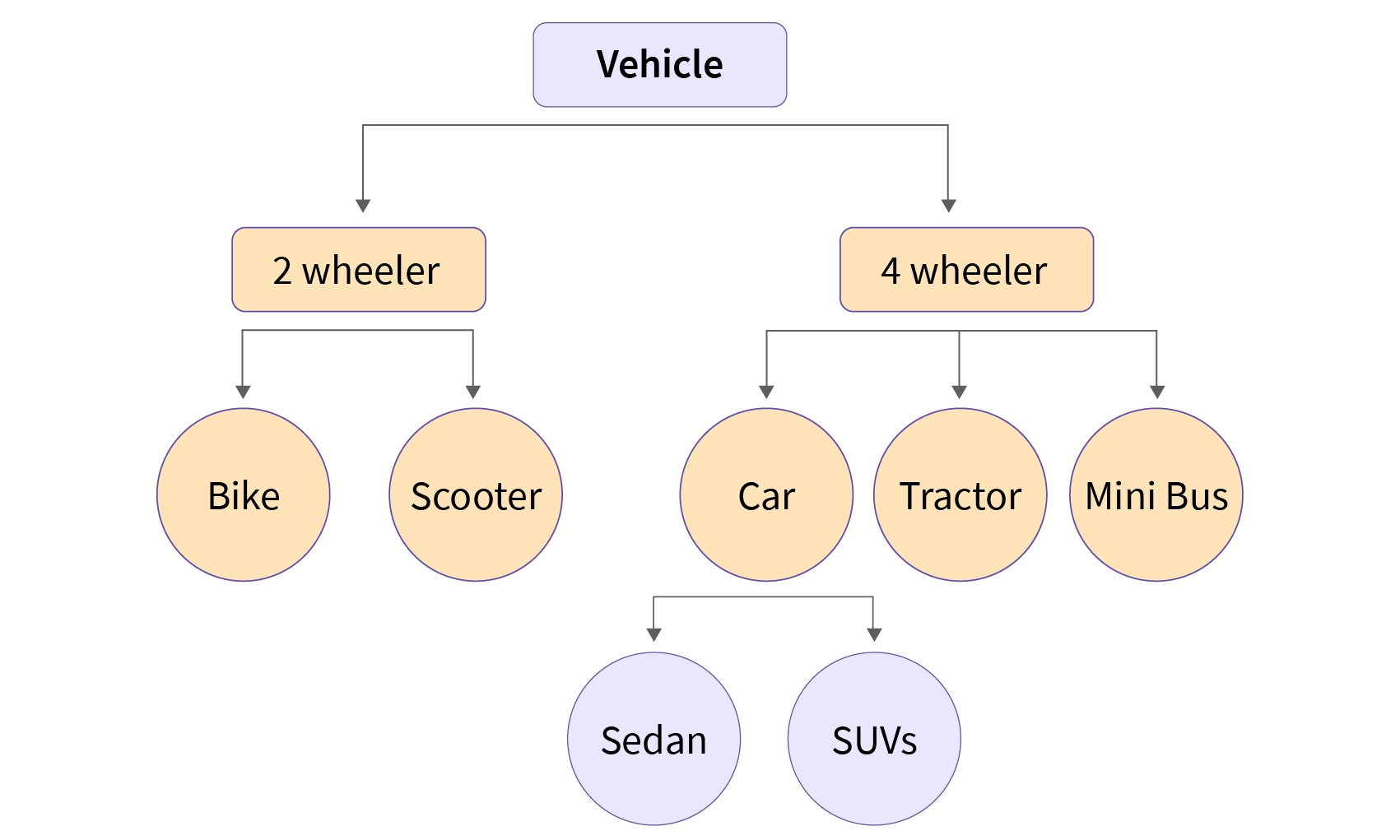
- The structure of the hierarchical model resembles a tree.
- In this model each record in DBMS is represented as a node
- A parent node organizes and connects to its child nodes, establishing a clear parent-to-child hierarchy.
- A parent record can have multiple child records, but each child record has only one parent record
- However the hierarchical approach is no longer widely applied
- Advantages:
- Easy to grasp.
- Retrieving data in a One-to-Many connection is efficient
- Disadvantages:
- Inflexibility in reorganizing data.
- Accessing complicated data structures may be challenging
- Redundant data storage, which might cause anomalies and inconsistencies
NETWORK MODEL
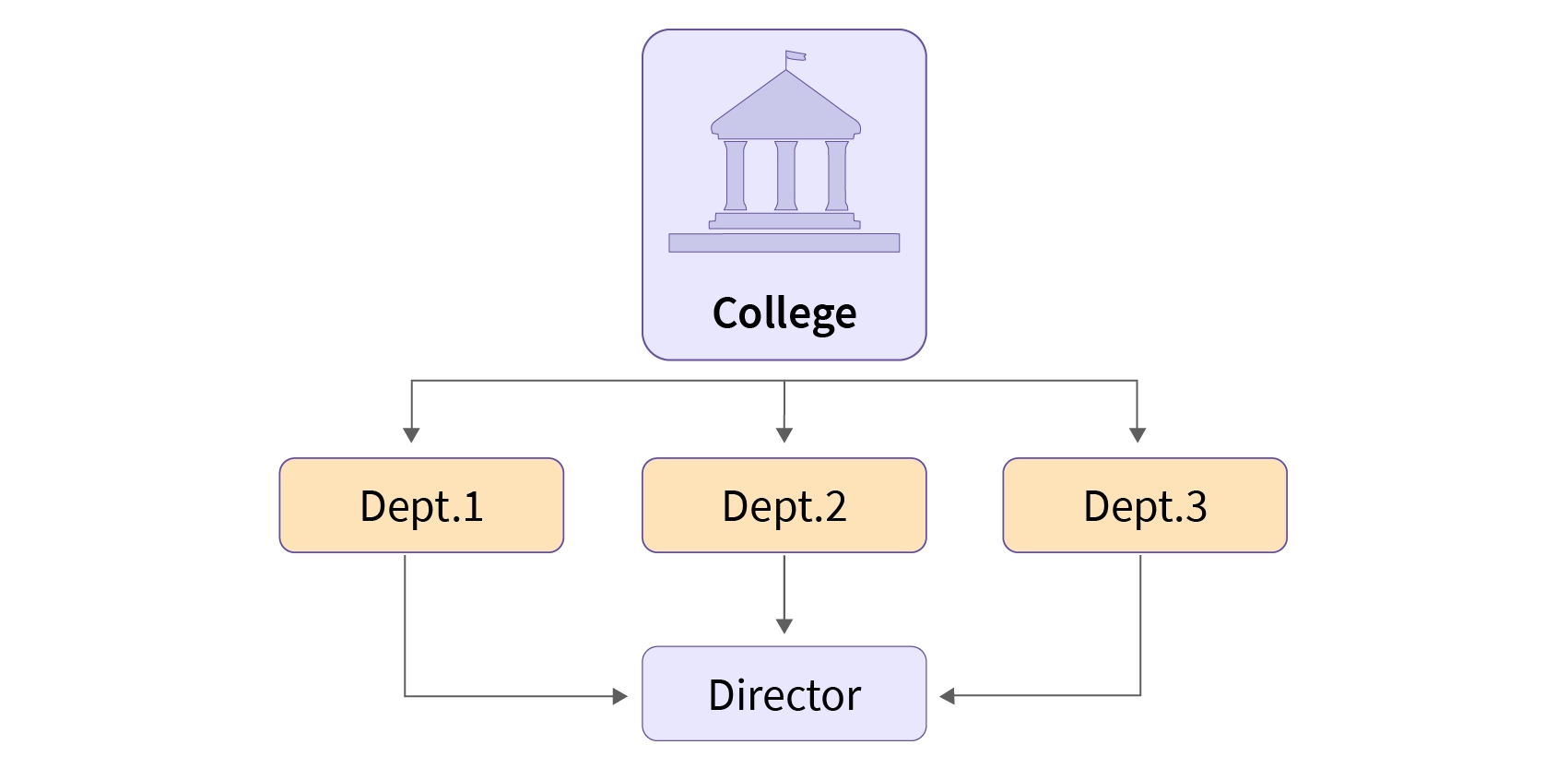
- A network data model is a flexible way to represent complex relationships between data entities.
- A network model is nothing but a generalization of the hierarchical data model
- Allow Many-to-Many relationships, a record can also have more than one parent.
- It can be represented as a graph in which object types are the nodes and relationships are the edges.
- Advantages:
- Because of its numerous parent ties, it is more adaptable than the hierarchical approach
- Ideal for managing intricate, Many-to-Many connections
- Disadvantages:
- Increased complexity in database design and management
- Requires complex programming in order to manage and work with data
RELATIONAL MODEL
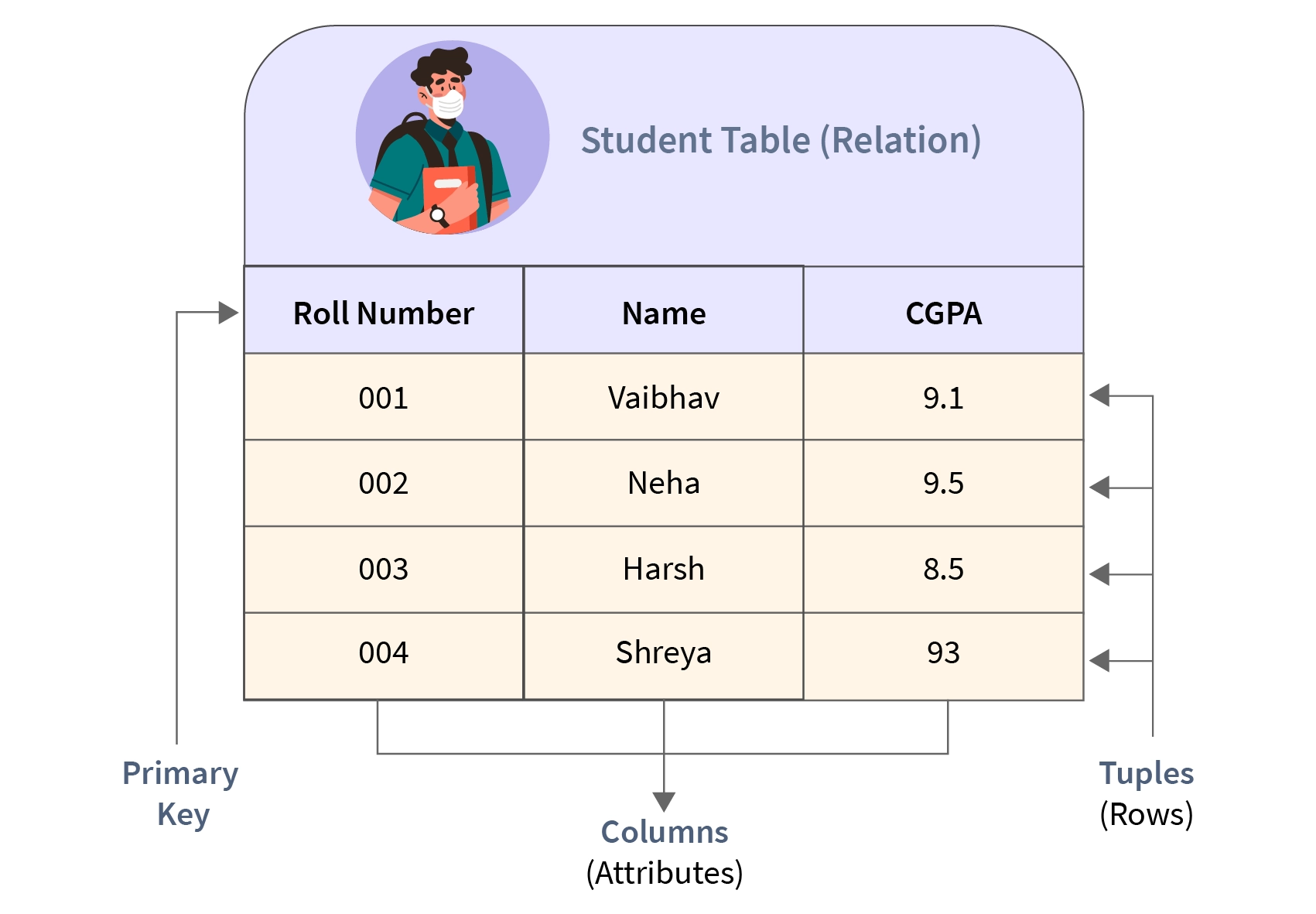
- The data is organized into a collection of two-dimensional inter-related tables, also known as relations.
- Each relation is a collection of columns and rows, where the column represents the attributes of an entity and the rows (or tuples) represents the records.
- It is frequently utilised in database design and is strongly related to RDBMS
- Advantages:
- High data independence and flexibility
- Offers robust and user-friendly querying features
- Removes duplication by use of normalization
- Disadvantages:
- For certain kinds of straight forward data retrieval tasks, they may not perform as well as hierarchical models
- Demands a deeper comprehension of SQL and normalization principles
ENTITY-RELATIONSHIP MODEL
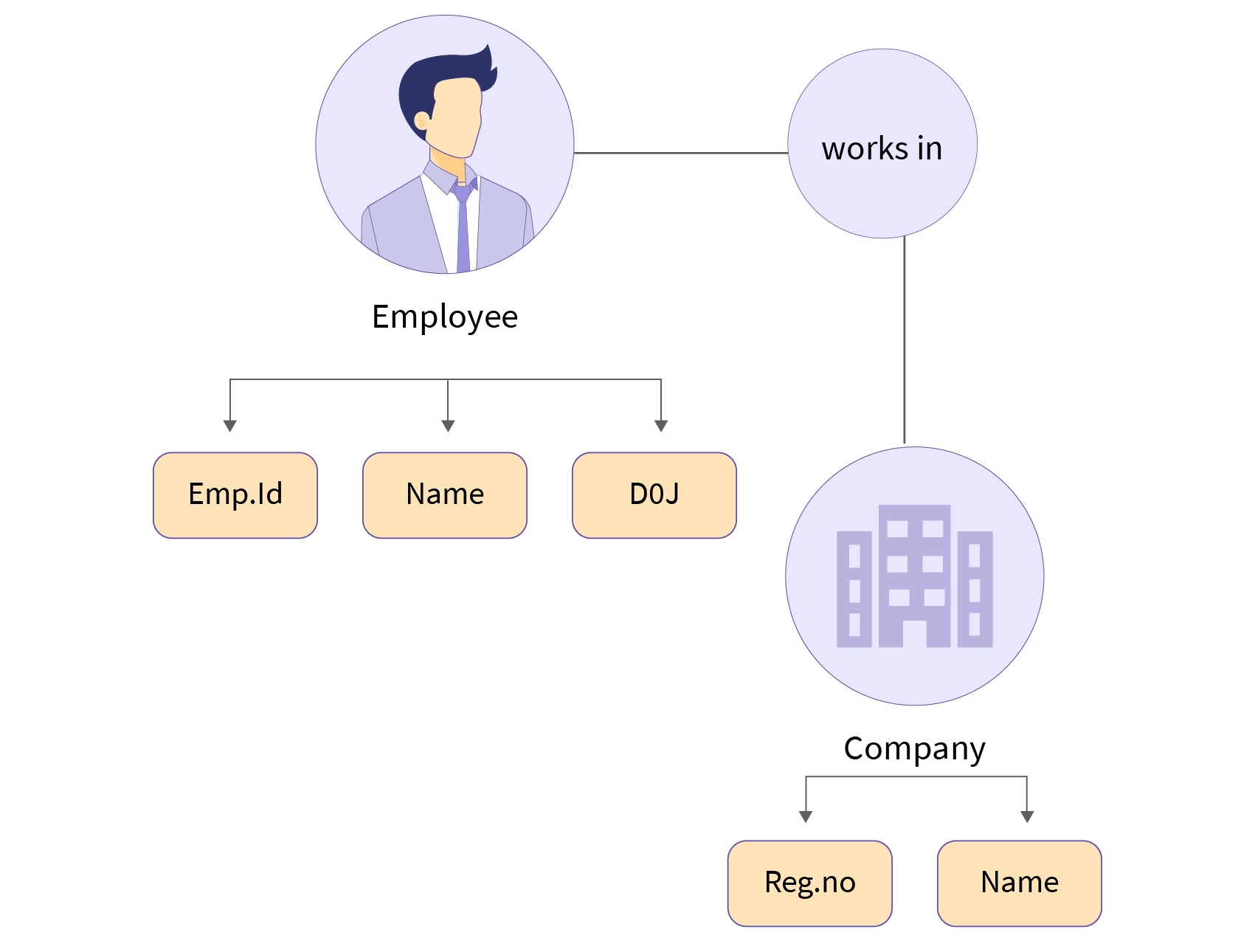
- An Entity-Relationship model is a high-level data model that describes the structure of the database
- It is used to represent logical structure of the database
- Entity: An object that is stored as data. For example Student, Course, or Company
- Attribute: Properties that describe an entity. For example StudentID, CourseName, or EmployeeEmail
- Relationship: A connection between entities. For Example Student enrols in a Course
- Uses of ER Diagrams in DBMS:
- E-R diagrams represent the E-R model in a database, making them easy to convert into relations (tables).
- These diagrams serve the purpose of real-world modelling of objects which makes them intently useful.
- Unlike technical schemas, E-R diagrams require no technical knowledge of the underlying DBMS used.
- They visually model data and its relationships, making complex systems easier to understand.
- Advantages:
- Easy to understand and visualize.
- Helps in designing databases efficiently.
- Reduces data redundancy.
- Provides a clear blueprint before implementation.
- Disadvantages:
- Complex for large databases
- Designing and maintaining an ER model requires time and effort
- Some complex rules and constraints are hard to show
- Not directly implementable: It must be converted into a relational model before implementation.
COMPARISION
| Basis | Hierarchical Model | Network Model | Relational Model | E-R Model |
|---|---|---|---|---|
| Structure | Tree | Network/Graph | Tables | Diagram |
| Data | Records | Records | Rows and columns | Entities and attributes |
| Relationship | Parent–Child | Linked records | Tables linked by keys | Entities connected by relationships |
| Relationship Type | Mainly 1:M | 1:1, 1:M, M:N | 1:1, 1:M, M:N | 1:1, 1:M, M:N |
| Flexibility | Low | Medium | High | High |
| Complexity | Simple | Complex | Simple | Easy to understand |
| Data Access | Fixed path | Links/Pointers | SQL queries | Conceptual design |
| Storage | Tree structure | Network structure | Tables | Not directly stored |
| Main Use | Hierarchical data | Complex relationships | Database management | Database design |
| Example | Company → Employees | Students → Courses | Student table | Student — Enrolls — Course |