MLDNN-02 Supervised & Unsupervised Learning
On This Page
Linear Regression
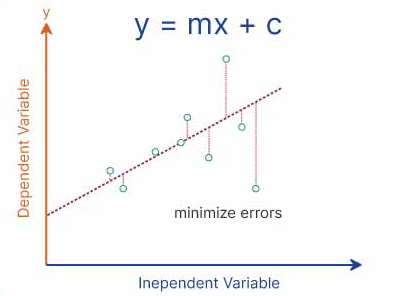
- Linear Regression is a supervised learning algorithm used to predict continuous numerical values.
- It shows the relationship between an input variable and an output variable using a straight line.
- It is one of the simplest and most commonly used algorithms in Machine Learning.
Mathematical Representation
- Linear Regression is represented by the equation:
y = mx + c
- Where:
- y = predicted output
- x = input feature
- m = slope (rate of change)
- c = intercept (value of y when x = 0)
How Linear Regression Works
- Data points are plotted on a graph.
- A straight line (best fit line) is drawn through the data.
- The line is chosen such that it minimizes the prediction error.
- This is usually done using the Least Squares Method.
Derivation
- A straight line is assumed between input and output.
- The slope (m) represents how much y changes when x changes.
- The intercept (c) represents the starting point of the line.
- The best values of m and c are calculated such that the error between predicted and actual values is minimum.
- Thus, the model fits a line that best represents the data.
Use in Prediction Problems
- Linear Regression is used when we need to predict continuous values based on input data.
- It finds a relationship between variables and uses it to make predictions for new data.
Example
- Predicting student marks based on study hours:
- If study hours increase, marks also increase.
- The model learns this pattern and predicts marks for new students.
- Predicting salary based on experience:
- More experience generally leads to higher salary.
- The model uses past data to estimate future salary.
Applications
- House price prediction
- Sales forecasting
- Salary prediction
- Temperature prediction
Polynomial Regression
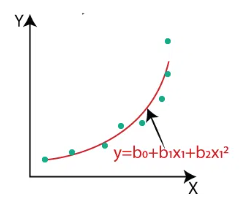
- Polynomial Regression is a type of regression algorithm used to model non-linear relationships between input and output variables.
- It is an extension of Linear Regression but fits a curved line instead of a straight line.
- It is used when the data shows a non-linear pattern.
Mathematical Representation
-
The equation of Polynomial Regression is:
y = b₀ + b₁x + b₂x² + b₃x³ + ... + bₙxⁿ -
Where:
- y = predicted output
- x = input variable
- b₀, b₁, b₂, … = coefficients
- n = degree of the polynomial
How Polynomial Regression Works
- The model transforms the original input variable into higher-degree terms (x², x³, etc.).
- These new features allow the model to fit a curved relationship in the data.
- It then applies linear regression on these transformed features.
- The goal is to minimize the error between predicted and actual values.
Example
- Suppose we have data for study hours and marks:
- At first, marks increase slowly, then rapidly.
- A straight line cannot fit this pattern properly.
- Polynomial Regression fits a curve that better represents the data.
Advantages
- Can model complex and non-linear relationships.
- Provides better accuracy than linear regression for curved data.
- Flexible due to adjustable polynomial degree.
Disadvantages
- Can lead to overfitting if the degree is too high.
- More complex than linear regression.
- Requires careful selection of polynomial degree.
Applications
- Predicting growth trends
- Sales forecasting with seasonal variation
- Temperature and weather prediction
- Biological and scientific data modeling
Logistic Regression
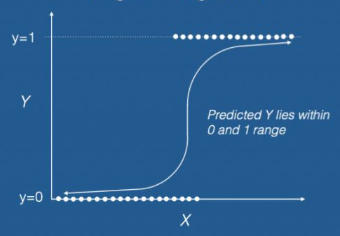
- Logistic Regression is a supervised learning algorithm used for classification problems.
- It predicts the probability of an output belonging to a particular category.
- Unlike Linear Regression, it is used when the output is categorical (e.g., Yes/No, 0/1).
How Logistic Regression Works
- Logistic Regression uses a mathematical function called the sigmoid function.
- The sigmoid function converts any value into a range between 0 and 1.
- Based on this probability, the model classifies the output into a specific category.
- For example, if the probability is greater than 0.5, it may classify as “Yes”, otherwise “No”.
Key Features
- It is mainly used for binary classification problems.
- It can also be extended to multiclass classification.
- It provides probability-based outputs, making it easy to interpret.
Applications of Logistic Regression
- Spam Detection: Classifies emails as spam or not spam based on content and keywords.
- Medical Diagnosis: Predicts whether a patient has a disease or not based on symptoms and test results.
- Credit Card Fraud Detection: Identifies whether a transaction is fraudulent or genuine.
- Student Result Prediction: Predicts whether a student will pass or fail based on study data.
- Customer Churn Prediction: Predicts whether a customer will continue a service or leave.
K-Nearest Neighbors (KNN)
- K-Nearest Neighbors (KNN) is a supervised learning algorithm used for both classification and regression problems.
- It works based on the idea that similar data points are located close to each other.
- It classifies new data points by comparing them with the nearest existing data points.
How KNN Works
- Choose the number of neighbors (K value).
- Calculate the distance between the new data point and all existing data points.
- Select the K nearest neighbors based on distance.
- For classification, assign the class that is most common among the neighbors.
- For regression, take the average of the nearest values.
Example
- Suppose we have two categories: Apple and Orange.
- Each fruit is described using features like color, size, and shape.
- When a new fruit is given, the algorithm checks its nearest neighbors.
- If most of the nearest neighbors are Apples, it classifies the new fruit as Apple.
- If most neighbors are Oranges, it classifies it as Orange.
Effect of K on Performance
-
Small K (e.g., K = 1)
- Model becomes sensitive to noise.
- Can lead to overfitting (very specific to training data).
-
Large K (e.g., K = 10 or more)
- Model becomes more generalized.
- Can lead to underfitting (loses important details).
-
Optimal K
- A moderate value (like 3, 5, or 7) is usually chosen.
- It balances accuracy and generalization.
Key Points
- KNN is a simple and easy-to-understand algorithm.
- It does not require a training phase (lazy learning).
- The choice of K value is very important for accuracy.
Applications
- Recommendation systems
- Image recognition
- Medical diagnosis
- Customer segmentation
Support Vector Machine (SVM)
- Support Vector Machine (SVM) is a supervised learning algorithm used for classification and regression problems.
- It works by finding the best boundary (called a hyperplane) that separates data into different classes.
- The main objective of SVM is to maximize the distance between the boundary and the nearest data points.
How SVM Works
- Data points are plotted in a feature space.
- SVM finds an optimal hyperplane that separates different classes.
- The data points closest to the boundary are called support vectors.
- These support vectors play a key role in defining the decision boundary.
Concept of Hyperplane
- A hyperplane is a decision boundary that separates data points into different classes.
- In 2D, it is a straight line; in 3D, it becomes a plane.
- SVM finds the optimal hyperplane that best divides the data into classes.
Concept of Margin
- Margin is the distance between the hyperplane and the nearest data points (support vectors).
- SVM tries to maximize this margin to improve model accuracy and generalization.
- A larger margin leads to better separation between classes and reduces classification errors.
Concept of Kernel
- Kernel is a function used to transform data into a higher-dimensional space.
- It is useful when data is not linearly separable.
- By using kernels, SVM can create complex boundaries to separate data.
Common Types of Kernels
- Linear Kernel: Used when data is linearly separable.
- Polynomial Kernel: Used for curved relationships.
- RBF (Radial Basis Function): Used for complex, non-linear data.
Example
- Suppose we want to classify students as Pass or Fail based on marks.
- SVM finds a boundary that separates pass and fail students clearly.
- If the data is not linearly separable, a kernel is used to create a better boundary.
Accuracy
- Accuracy measures how many predictions made by the model are correct out of the total predictions.
- It gives an overall idea of the model’s performance.
- Example: If 90 out of 100 predictions are correct, accuracy is 90%.
Precision
- Precision measures how many of the predicted positive cases are actually correct.
- It focuses on the correctness of positive predictions.
- Example: Out of all emails predicted as spam, how many are truly spam.
Recall
- Recall measures how many actual positive cases are correctly identified by the model.
- It focuses on capturing all real positive instances.
- Example: Out of all actual spam emails, how many were correctly detected.
F1-Score
- F1-score is the harmonic mean of precision and recall.
- It provides a balance between precision and recall, especially when there is an imbalance in data.
- It is useful when both false positives and false negatives are important.
Why These Metrics Are Important
- They help evaluate how well a machine learning model performs.
- Accuracy alone may be misleading when data is imbalanced.
- Precision is important when false positives are costly (e.g., spam detection).
- Recall is important when missing a positive case is dangerous (e.g., medical diagnosis).
- F1-score provides a balanced measure when both precision and recall matter.
Define Accuracy, Precision, Recall and F1-Score using a confusion matrix.
Confusion Matrix
- A confusion matrix is a table used to evaluate the performance of a classification model.
- It compares actual values with predicted values.
| Predicted Positive | Predicted Negative | |
|---|---|---|
| Actual Positive | True Positive (TP) | False Negative (FN) |
| Actual Negative | False Positive (FP) | True Negative (TN) |
Accuracy
- Accuracy measures the overall correctness of the model.
- Formula: (TP + TN) / (TP + TN + FP + FN)
- It shows how many predictions are correct out of total predictions.
Precision
- Precision measures how many predicted positive cases are actually correct.
- Formula: TP / (TP + FP)
- It focuses on reducing false positives.
Recall
- Recall measures how many actual positive cases are correctly identified.
- Formula: TP / (TP + FN)
- It focuses on reducing false negatives.
F1-Score
- F1-score is the harmonic mean of precision and recall.
- Formula: 2 × (Precision × Recall) / (Precision + Recall)
- It balances both precision and recall.
When is Accuracy not a good evaluation metric? Explain using an imbalanced dataset example.
When Accuracy is Not Suitable
- Accuracy is not a reliable metric when the dataset is imbalanced, meaning one class has significantly more data than the other.
- In such cases, the model may appear to perform well by predicting only the majority class, while ignoring the minority class.
- This leads to misleading results, as the model does not truly learn meaningful patterns.
Imbalanced Dataset Example
-
Suppose we have a dataset of 100 emails:
- 95 are Not Spam
- 5 are Spam
-
If a model predicts all emails as “Not Spam”:
- Correct predictions = 95
- Wrong predictions = 5
- Accuracy = 95%
-
Even though accuracy is high, the model fails to identify any spam emails.
-
This means the model is useless for detecting spam, despite showing good accuracy.
Why This is a Problem
- The model ignores the minority class (Spam), which is often the most important.
- In real-world applications like fraud detection or medical diagnosis, missing positive cases can be dangerous.
- Therefore, relying only on accuracy can lead to incorrect conclusions about model performance.
Better Alternatives
- Precision: Focuses on correctness of positive predictions.
- Recall: Focuses on detecting all actual positive cases.
- F1-score: Balances both precision and recall.
Explain ROC Curve and ROC-AUC
ROC Curve (Receiver Operating Characteristic Curve)
- ROC Curve is a graphical tool used to evaluate the performance of classification models.
- It shows the trade-off between True Positive Rate (TPR) and False Positive Rate (FPR) at different threshold values.
- Each point on the curve represents a different decision threshold.
Key Terms
-
True Positive Rate (TPR) = TP / (TP + FN)
- Also known as Recall, it measures how many actual positives are correctly identified.
-
False Positive Rate (FPR) = FP / (FP + TN)
- It measures how many negative cases are incorrectly classified as positive.
ROC-AUC (Area Under the Curve)
-
ROC-AUC represents the area under the ROC curve.
-
It provides a single value to summarize the model’s performance across all thresholds.
-
Interpretation of AUC values:
- 1.0 → Perfect model
- 0.9 → Excellent model
- 0.7–0.8 → Good model
- 0.5 → Random guessing
Why ROC-AUC is Useful
- It evaluates model performance across all classification thresholds, not just one.
- It provides a balanced view of performance between true positives and false positives.
- It is less affected by class imbalance compared to accuracy.
- It allows easy comparison between multiple models—higher AUC indicates better performance.
Example
- If Model A has AUC = 0.90 and Model B has AUC = 0.75, Model A is considered better at distinguishing between classes.
Describe K-Means Clustering algorithm with step-by-step procedure.
What is K-Means Clustering
- K-Means Clustering is an unsupervised learning algorithm used to group similar data points into clusters.
- It divides the dataset into K number of clusters based on similarity.
- Each cluster has a center point called a centroid.
Step-by-Step Procedure
1. Choose number of clusters (K)
- Decide how many clusters you want to form in the dataset.
2. Initialize centroids
- Randomly select K points as initial centroids.
3. Assign data points
- Calculate the distance of each data point from all centroids.
- Assign each point to the nearest centroid.
4. Update centroids
- Recalculate the centroid of each cluster by taking the average of all points in that cluster.
5. Repeat the process
- Repeat steps 3 and 4 until the centroids no longer change or stabilize.
6. Final clusters
- The final groups formed are the clusters with similar data points.
Example
- Grouping customers based on income and spending habits into different categories.
Compare Hierarchical Clustering and DBSCAN. Mention advantages and limitations.
Hierarchical Clustering
- Hierarchical Clustering builds clusters in a tree-like structure called a dendrogram.
- It can be either agglomerative (bottom-up) or divisive (top-down).
- It does not require specifying the number of clusters in advance.
DBSCAN (Density-Based Spatial Clustering of Applications with Noise)
- DBSCAN is a density-based clustering algorithm.
- It groups data points based on density and identifies outliers as noise.
- It requires parameters like minimum points and distance (epsilon).
Key Differences
| Aspect | Hierarchical Clustering | DBSCAN |
|---|---|---|
| Approach | Builds clusters step-by-step in a hierarchy | Groups data based on density of points |
| Cluster Shape | Works well for simple structures | Detects clusters of arbitrary shapes |
| Handling Noise | Does not handle noise effectively | Identifies and removes noise/outliers |
| Number of Clusters | No need to predefine K | No fixed number, depends on density |
Advantages
Hierarchical Clustering
- Easy to understand and visualize (dendrogram).
- No need to specify number of clusters initially.
DBSCAN
- Can find clusters of any shape.
- Effectively handles noise and outliers.
- Works well with large datasets.
Limitations
Hierarchical Clustering
- Computationally expensive for large datasets.
- Sensitive to noise and outliers.
DBSCAN
- Choosing parameters (epsilon and min points) is difficult.
- Not suitable when data has varying densities.
Principal Component Analysis (PCA)
- PCA is an unsupervised learning technique used for dimensionality reduction.
- It transforms a large number of features into a smaller set of new variables called principal components.
- These components capture the most important information (maximum variance) in the data.
How PCA Works
- The data is first standardized so that all features are on the same scale.
- PCA computes the directions (principal components) where the data varies the most.
- The first principal component captures the highest variance, the second captures the next highest, and so on.
- These components are orthogonal (independent) to each other.
How PCA Reduces Dimensionality
- Instead of using all original features, PCA selects only the top few principal components.
- These components retain most of the important information from the dataset.
- Less important features (with low variance) are removed.
- This reduces the number of dimensions while preserving the overall structure of the data.
Example
- A dataset with 10 features can be reduced to 2 or 3 principal components while still retaining most of the information.
- This makes computation faster and visualization easier.
Advantages
- Reduces complexity of the dataset.
- Improves model performance and speed.
- Removes redundant and correlated features.
Differentiate between PCA and LDA
Principal Component Analysis (PCA)
- PCA is an unsupervised technique used for dimensionality reduction.
- It focuses on maximizing variance in the data.
- It does not consider class labels.
- It is mainly used for data compression and visualization.
Linear Discriminant Analysis (LDA)
- LDA is a supervised technique used for dimensionality reduction and classification.
- It focuses on maximizing the separation between different classes.
- It uses class labels to improve class discrimination.
- It is mainly used when classification is required.
Key Differences
| Aspect | PCA (Principal Component Analysis) | LDA (Linear Discriminant Analysis) |
|---|---|---|
| Learning Type | Unsupervised | Supervised |
| Objective | Maximize variance | Maximize class separation |
| Use of Labels | Does not use labels | Uses class labels |
| Application | Data reduction, visualization | Classification, feature reduction |
When to Prefer LDA over PCA
- When the dataset has labeled data and the goal is classification.
- When we want to maximize separation between different classes.
- When improving classification accuracy is more important than just reducing dimensions.